Bookly products Business tips New release Comparisons & Integrations Marketing tools Tips & Best Practices Use Cases News Bookly News Show all
Autor: Bookly Team
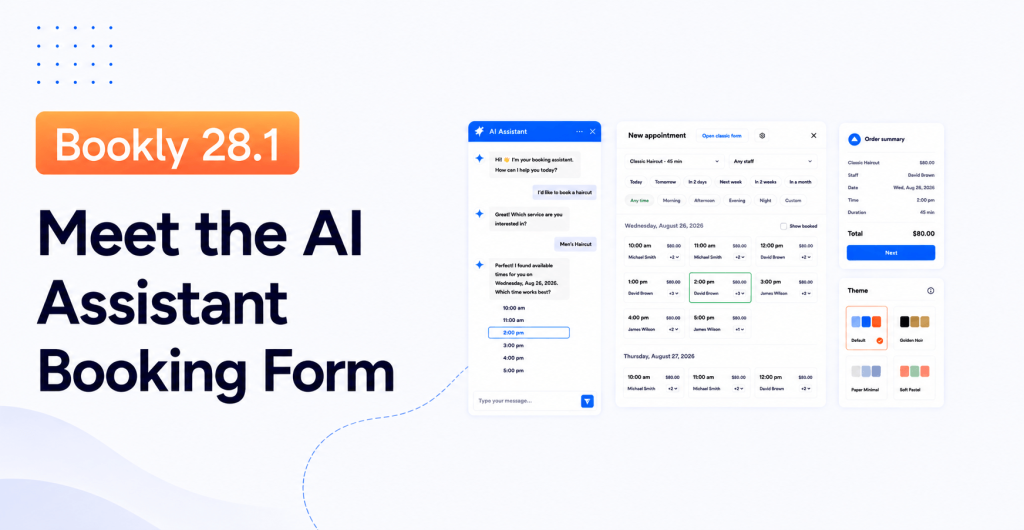
Bookly 28.1: Meet the AI Assistant Booking Form (and a Lot More)
Every once in a while, a release changes how customers experience your booking page. Bookly 28.1 is one of those. The headline change is an AI Assistant booking form — a new front-end widget that lets your customers book by having a short conversation instead of clicking through a step-by-step form. It sits next to everything Bookly already does, so nothing about your current setup breaks. On top of that, this release ships a new backend booking wizard for admins, modern themes and styling presets for the classic booking form,...
How to Book Appointments Longer Than 1 Day
Some companies provide services that last throughout the day or even take several days, such as all-day conferences, weekend educational...
Top 5 Automations to Use in Bookly
What makes a WordPress online booking plugin stand out among the rest of the systems for event scheduling? Of course,...
What’s the difference between Multiply Appointments (Add-on) & Custom Duration (Add-on)
Add-ons for Bookly have been created to add more advanced functionality to the default configuration of your Bookly PRO. If...
How Bookly Ensures You Never Miss an Appointment
The last thing any business owner or service provider would want is to miss an appointment with a client. No...
New version release. See what’s new in Bookly PRO 4.4.
Bookly is continually getting better to provide you with the most helpful features for your business. This update brings several...
Appointment Cancellation by Staff – 3 options
Whatever the reason, there are situations when your staff member cannot make an appointment and has no choice but to...
How to Use Resources in Bookings
Do you provide services that require some rooms, equipment, or things during the appointment? With Bookly features, you can create...
How to Block a Customer From Making an Appointment
In some cases, you may want to restrict some customers from making multiple appointments or even block someone from all...