Bookly 28.1: Meet the AI Assistant Booking Form (and a Lot More)
Every once in a while, a release changes how customers experience your booking page. Bookly 28.1 is one of those.
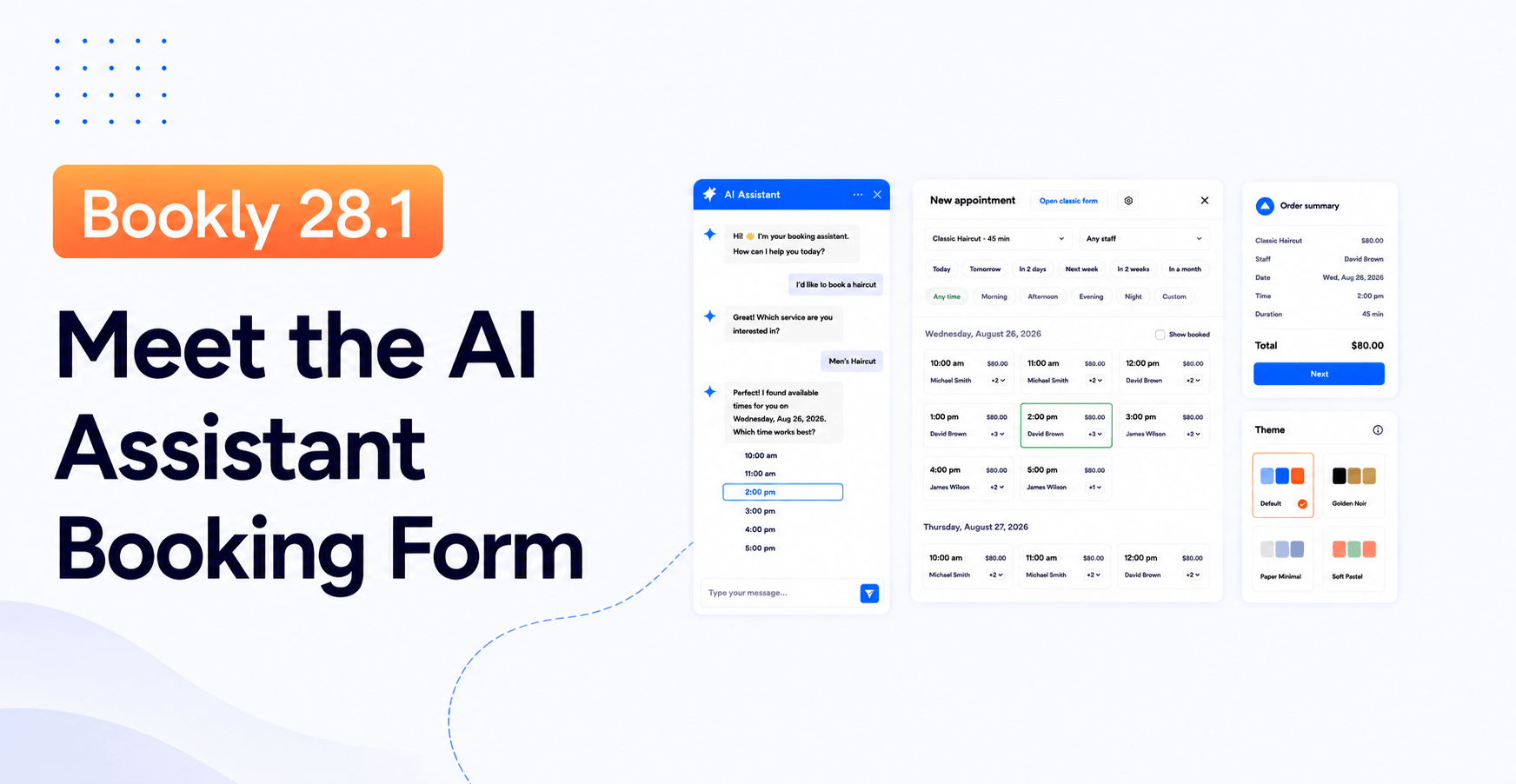
The headline change is an AI Assistant booking form — a new front-end widget that lets your customers book by having a short conversation instead of clicking through a step-by-step form. It sits next to everything Bookly already does, so nothing about your current setup breaks.
On top of that, this release ships a new backend booking wizard for admins, modern themes and styling presets for the classic booking form, a redesigned Bookly Cloud billing experience, and cleaner payment reporting in the Dashboard for Packages, Events, and Gift Cards.
We also refreshed our pricing — the new lineup is live with Summer Sale pricing, fuller plans at every tier, and Bookly Cloud bonuses for new Cloud users.
Here is what changed, in order of what will matter most to your day-to-day.
The AI Assistant booking form: booking as a conversation
The classic Bookly booking form asks a customer to choose a service, then a staff member, then a date and time, then fill in contact details — one step at a time. It works. Millions of appointments have gone through it.
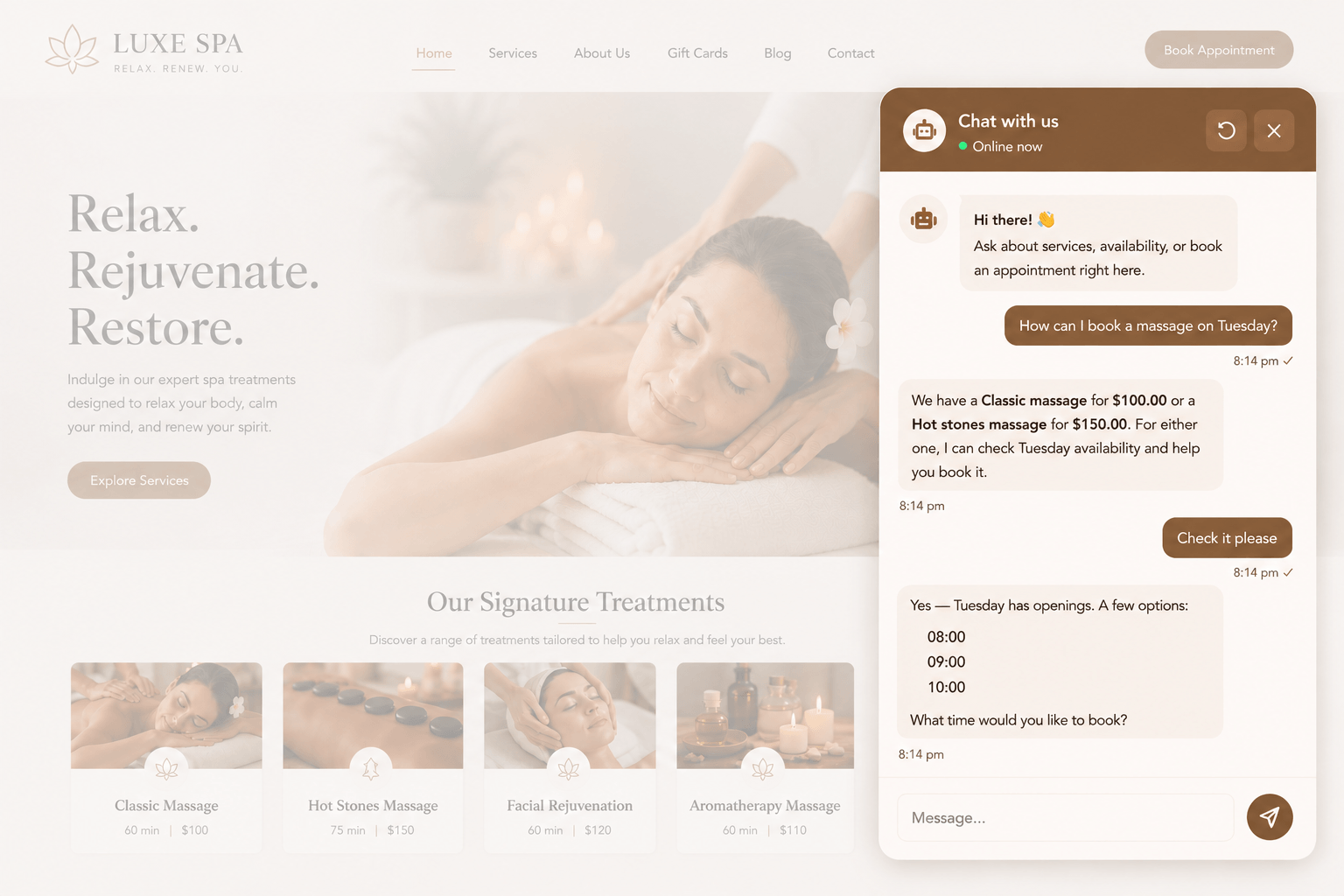
But some customers prefer to just say what they want: “I need a 30-minute haircut with Anna, this Friday afternoon.” The new AI Assistant booking form lets them do exactly that.
What it is. A front-end widget you can add to any page on your WordPress site. Instead of a step-by-step form, the customer types (or picks from suggestions) and the assistant walks them through service selection, staff, date/time, and confirmation in a single flowing conversation.
What it is not. It is not a replacement for your existing booking form. You can run both — a classic step-by-step form for people who like structure, and the AI Assistant for people who prefer to type. The two share the same backend: staff schedules, services, availability, notifications, payments.
Why it matters. For a lot of service businesses, the biggest friction on a booking page is not the number of fields — it is the feeling of a form. Conversation removes that friction. First tests are showing shorter time-to-book and a more natural experience on mobile, where step-by-step forms feel especially clunky.
How to try it. Update to Bookly 28.1, activate AI Assistant in your Bookly Cloud account, then go to Bookly → Appearance → AI Assistant to configure the widget and drop the shortcode on any page. Full setup walkthrough is in our help center.
A new backend booking wizard for the appointments you take manually
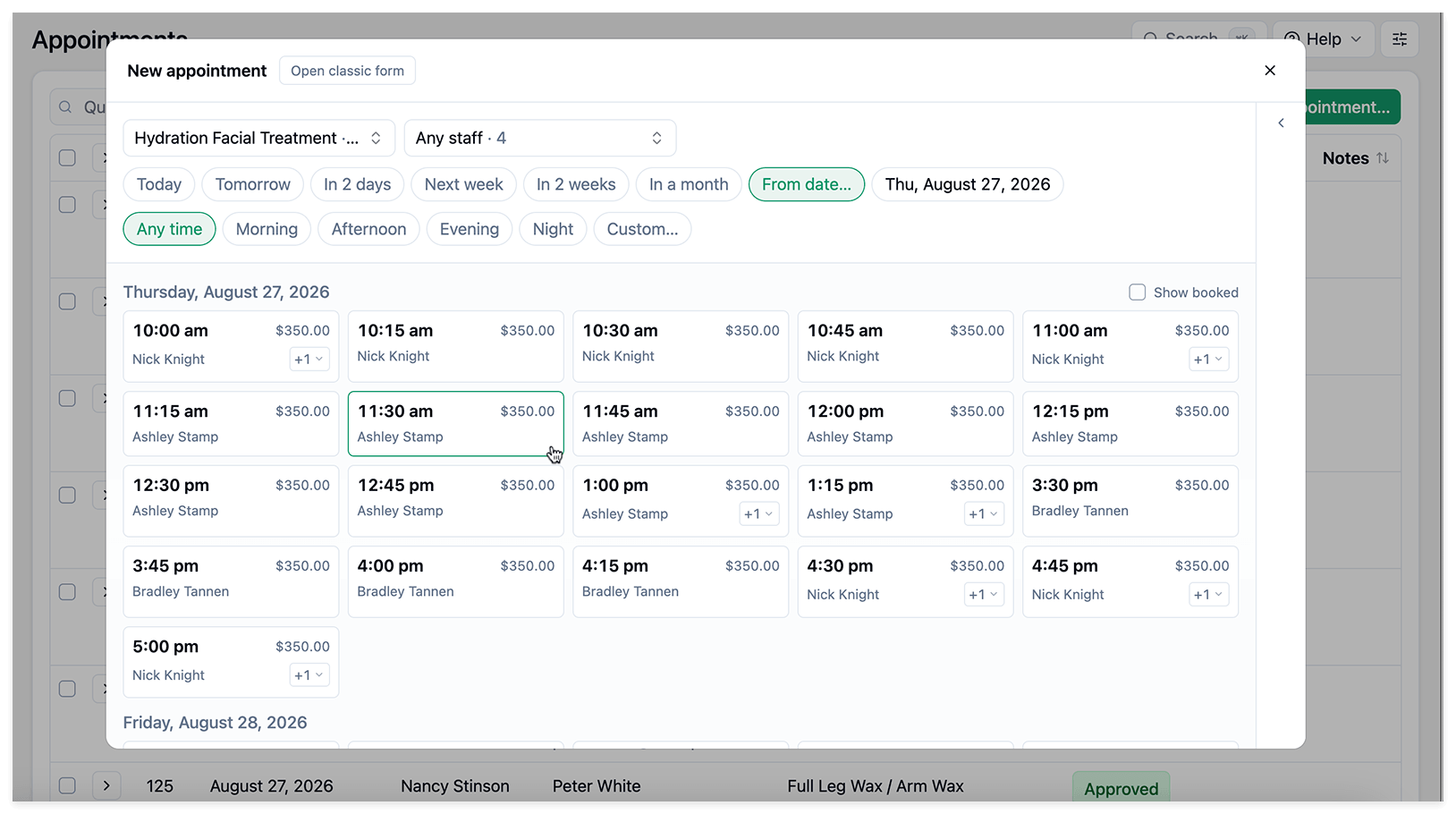
Not every booking comes through the website. Plenty of appointments still arrive by phone, WhatsApp, email, or a walk-in.
For those, Bookly 28.1 ships a new backend booking wizard for admins. You open New appointment, choose the service and staff member, use quick date and time filters to find the right slot, and add that appointment to the order.
The order panel is the important part. If the same customer needs more than one service, you can click Add another service, pick another slot, and keep building the order before creating the appointment. That means reception teams can now create several appointments for one customer from the backend in a single flow, with the appointments collected in the same order.
The classic form is still there, too — just click Open classic form if you prefer the previous style.
Together with the AI Assistant, this closes a loop: customers book online through whatever flow suits them (classic form or chat), and your team handles the phone/WhatsApp/email bookings through a matching wizard on the backend. Both sides feel like the same product.
Modern booking form themes and styling presets
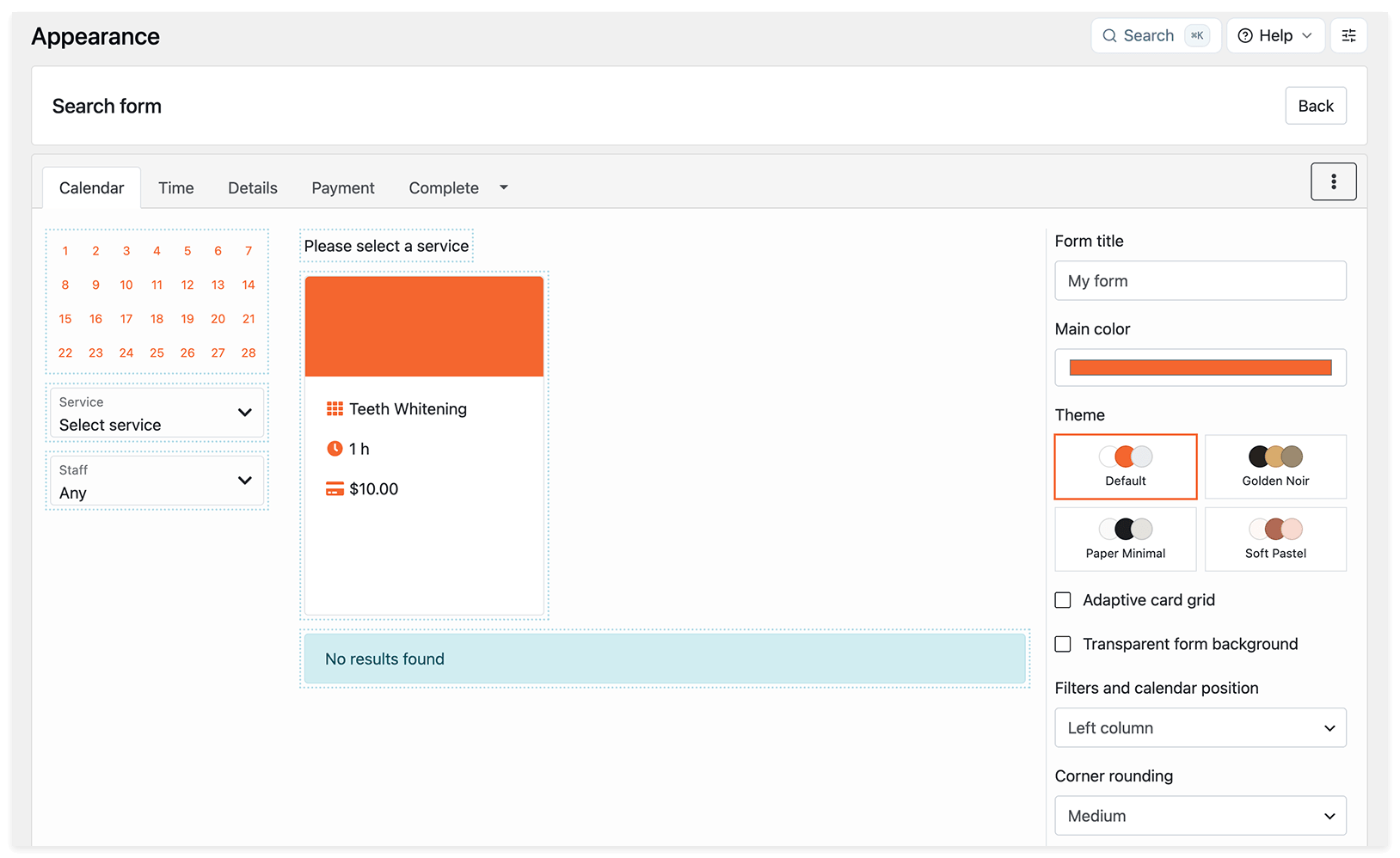
If you have ever wanted your booking form to look like your brand without touching CSS, this one is for you.
Bookly Pro 10.4 (shipped alongside 28.1) adds modern booking form themes and styling presets. Instead of one default look and a wall of CSS overrides, you now pick from a set of clean, mobile-optimized themes and keep fine-tuning the details in the settings.
The new styling controls include an adaptive card grid, transparent form background, corner rounding, card shadows, and filters and calendar position. The theme library will keep growing over time, so you will get more ready-made starting points in future updates.
You still have full CSS control if you need it. The presets are just a much faster starting point.
Find the new presets in Bookly → Appearance → Themes.
Bookly Cloud: redesigned billing and more control over auto-recharge
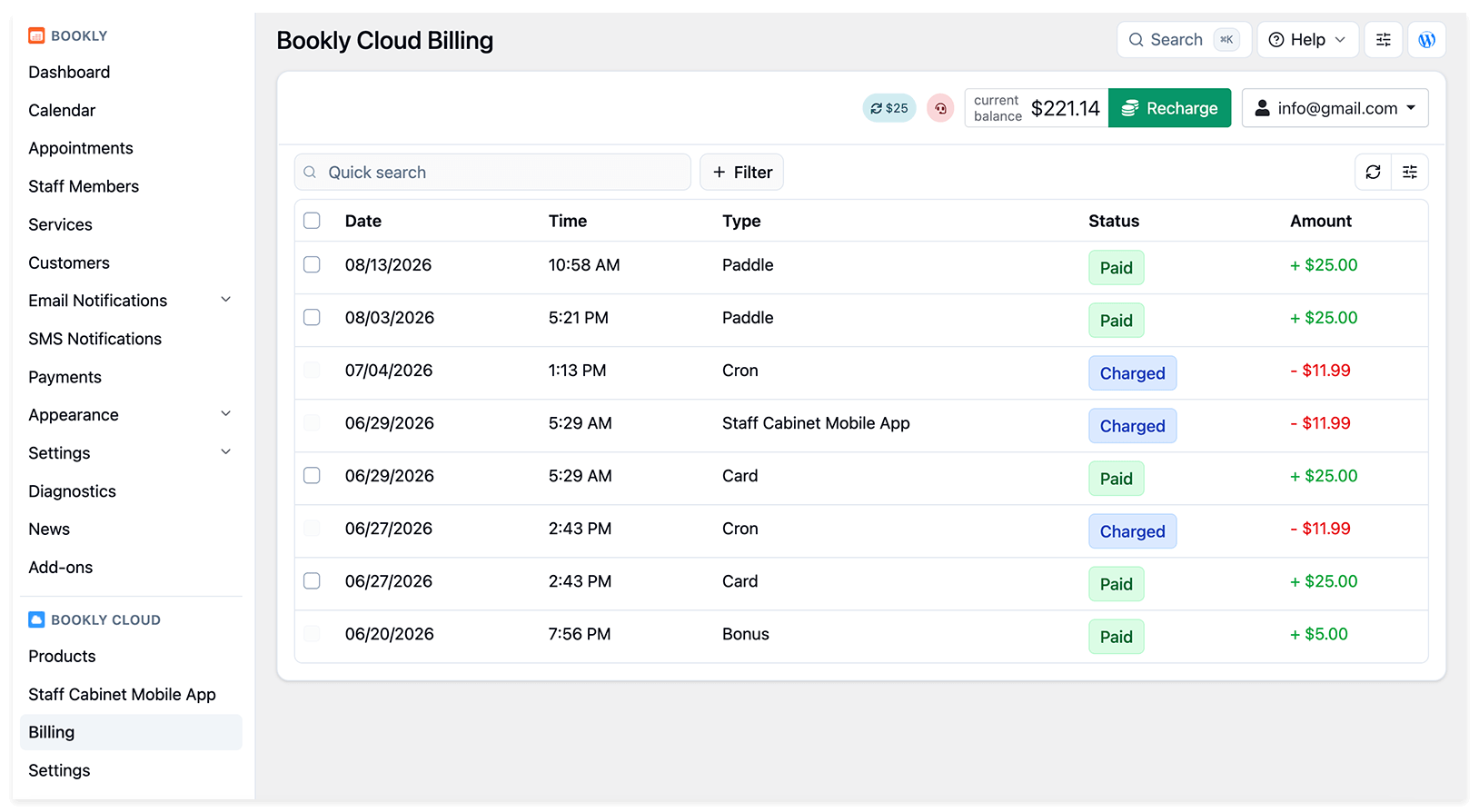
Bookly Cloud handles the utilities your booking plugin needs at runtime — SMS reminders, WhatsApp messages through your Meta Cloud API, Stripe with a low application fee. Version 28.1 gives it a serious billing polish.
Auto-recharge safeguards. To protect customers from unexpectedly frequent charges, Bookly now limits how many auto-recharges can be initiated by pay-as-you-go products, such as SMS Notifications and Voice Notifications, within a certain time period.
Once the limit is reached, any further auto-recharge attempts are skipped until the current time period ends. The customer also receives an email notification explaining why the auto-recharge was skipped. This is especially useful if someone abuses a booking form and triggers a large number of fake bookings with SMS or voice notification requests.
Redesigned Cloud billing. We also started rolling out a new Cloud billing experience, including redesigned invoices and related billing setup screens. The goal is simple: a clearer, more modern place to review Cloud billing details and manage the setup around them.
Already on Cloud? Good news — nothing to do. The new billing UI is already live in your account.
Not on Cloud yet? New Cloud users get a $5 credit at signup, plus up to $400 more on the first top-up. It is credited to your Cloud balance so you can try SMS, WhatsApp, or Stripe with the low application fee without spending anything of your own first.
Current first top-up bonuses:
- Top up $25 → get +$5 (20% bonus)
- Top up $50 → get +$12 (24% bonus)
- Top up $100 → get +$28 (28% bonus)
- Top up $500 → get +$180 (36% bonus)
- Top up $1,000 → get +$400 (40% bonus, best value)
And if you already have Cloud connected — a good moment to open Bookly → Cloud → SMS notifications and verify that your SMS reminders are configured the way you want. (They are enabled by default when Cloud is connected, so it is a “verify” step, not a “turn on” step.)
Dashboard payment reporting: Packages, Events, Gift Cards
Small change, big quality-of-life win.
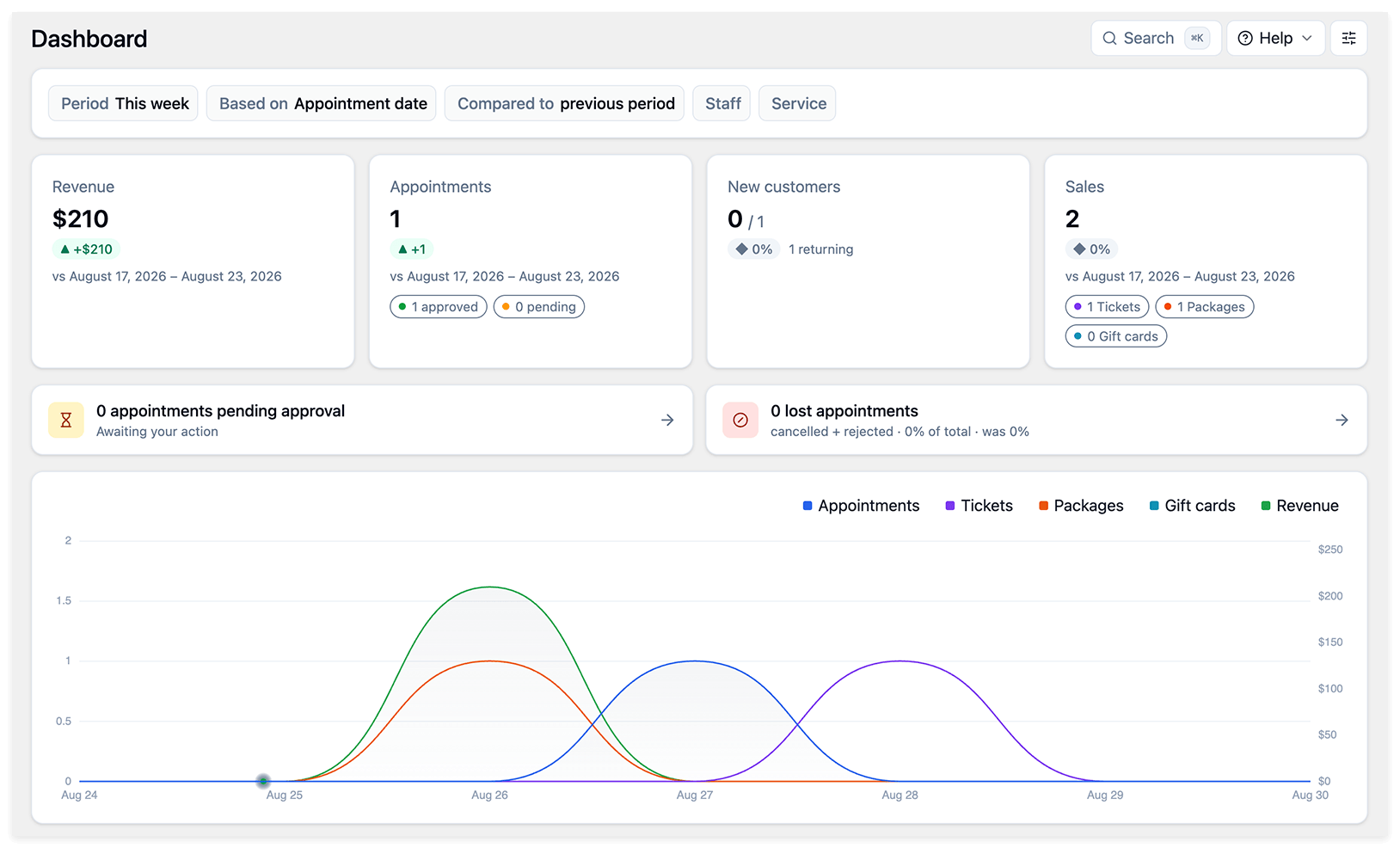
If you use the Packages, Events, or Gift Cards features, your Bookly Dashboard now also reflects the amounts of purchased items. They are displayed in the same way as regular appointment payments.
This means the amount shown on the Dashboard now provides a complete picture of your sales, rather than reflecting appointment payments only.
Add-on updates worth calling out
- Custom Fields 5.5 — added new CAPTCHA options. You can now choose the standard image CAPTCHA, Google reCAPTCHA v2 (checkbox), or Google reCAPTCHA v3 (invisible), depending on the type of verification experience you want on the booking form.
- Square 1.2 — updated to the latest Square API version. If you take payments through Square, this is a quiet but important compatibility upgrade.
- Bookly Pro 10.4 — modern booking form themes and styling presets (covered above), plus a fix for a warning on backend pages with filters and a fix for custom services in the Staff Cabinet Mobile App.
All other Bookly add-ons have been updated for compatibility with Bookly Pro 10.4 — no action needed on your side beyond running your usual update.
New pricing: fuller plans, better per-site value
Alongside 28.1, we shipped a refreshed pricing lineup, and the current prices on the site include a Summer Sale. The bigger product story is the rebuilt plan structure: every tier now delivers more value, with clearer differences between Free, Pro, Business, and Ultimate.
The current lineup:
- Free — the WordPress.org plugin for testing the booking workflow. It includes up to 5 services, 1 staff member, unlimited appointments, customizable design, individual staff schedule, email/SMS/WhatsApp notifications, local payments, booking list tools, unlimited booking forms, customer list management, 9 languages, Community support, and full access to updates.
- Pro — a 1-site license for solo professionals running their schedule on WordPress. It includes everything in Free, then adds unlimited services, unlimited staff, WooCommerce compatibility, Google Calendar sync, online meetings via Zoom / Google Meet, Email support, and full access to updates.
- Business — available for 1 or 5 sites, built for growing service businesses that need advanced booking, payment, customer, and reporting tools. It includes everything in Pro, then adds 20+ Email/SMS templates, custom notice periods, Stripe, PayPal Standard, deposit payments, Advanced Google Calendar, Outlook Calendar, Group Booking, Recurring Appointments, Custom Fields, Service Extras, Cart, Custom Duration, Special Days, online client access, client tags, Customer Cabinet, financial reports, analytics, CSV import/export, Staff Cabinet, Service Schedule, Coupons, and Priority support.
- Ultimate — available for 1, 20, or 100 sites, with the complete Bookly feature set for agencies and multi-location operations. It includes everything in Business, then adds Locations, PayPal Checkout, Authorize.Net, 2Checkout, PayU Latam, Waiting List, Chain Appointments, Multiply Appointments, Packages, Custom Statuses, Special Hours, Customer Information, Customer Groups, Invoices, Taxes, Discounts, Ratings, Files, Tasks, Multisite management, Mailchimp, Google Maps Address, Collaborative Services, Compound Services, Events, and Premium support.
Compared with other major booking tools, Bookly now offers a clearer upgrade path: Free for testing the workflow, Pro for a complete one-site schedule, Business for the core paid toolkit, and Ultimate for the full Bookly suite. Paid plans keep the per-site model, so businesses can grow their team without moving into per-seat pricing.
See the full lineup on the pricing page.
How to update
- In your WordPress admin, go to Plugins → Installed Plugins.
- Look for Bookly and any Bookly add-ons.
- Click Update Now.
- Update Bookly Pro to 10.4 and all add-ons to their latest versions to get full compatibility with 28.1.
If you use the Bookly Cloud services, no action is needed — the new billing UI is already live.
If you run into anything unexpected, our support team is one message away.
What is next
The AI Assistant booking form is the start of a bigger conversational-booking track — we are already testing more ways for it to handle rescheduling, follow-ups, and multi-service bookings inside the same chat. If you would like to shape what comes next, we would love your feedback: try 28.1, tell us what worked, tell us what did not, and we will fold it into 28.2.
Until then — happy booking.
Ready to try Bookly 28.1?
Update your plugin from the WordPress admin, or see the new pricing lineup → to pick the plan that fits your business. Free tier is available from WordPress.org — no signup required.