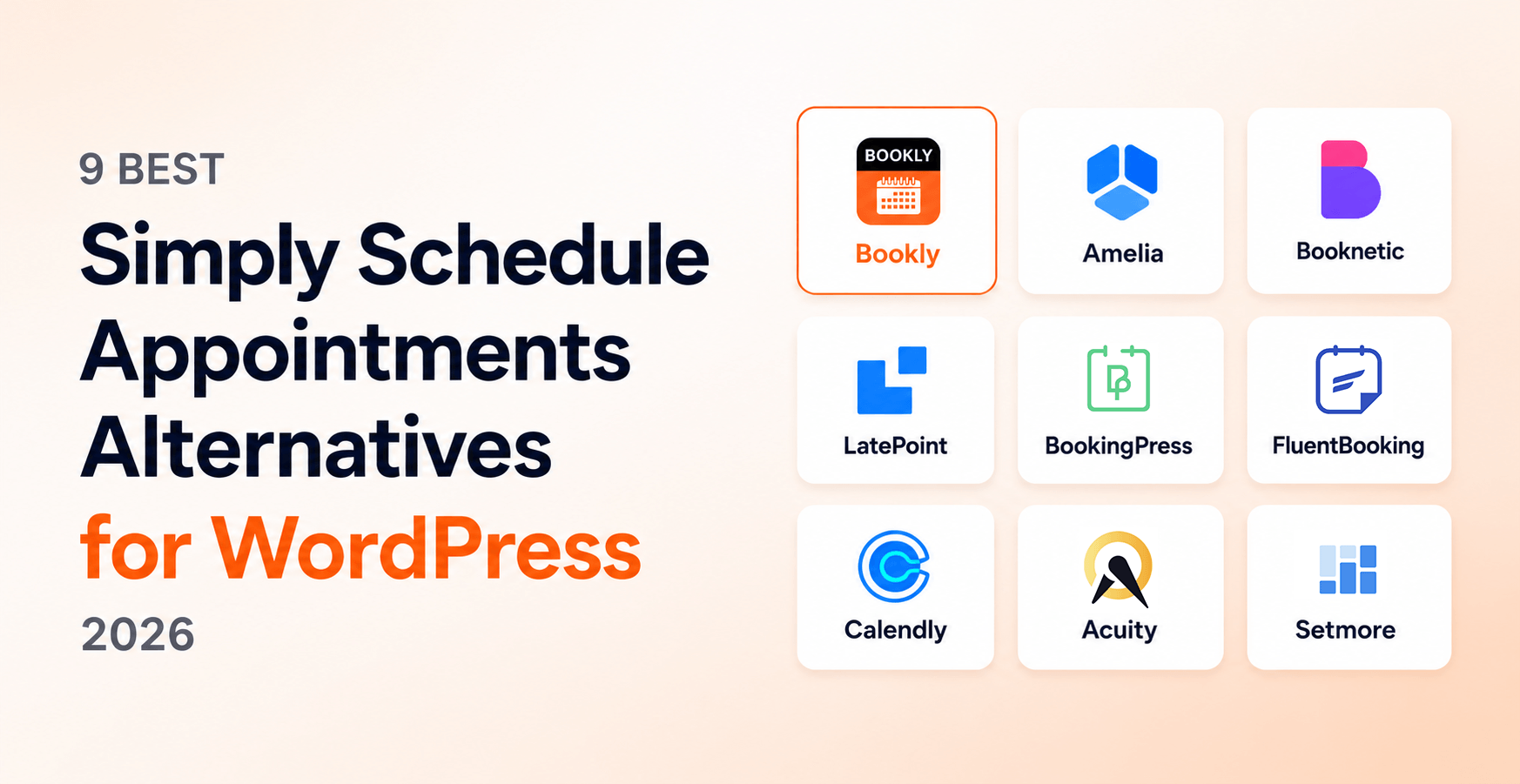
9 Best Simply Schedule Appointments Alternatives for WordPress in 2026
Simply Schedule Appointments (SSA) earned a perfect 5-star average on WordPress.org and is the only major WP booking plugin with zero negative reviews in 2026 — a genuinely impressive record. Yet a steady share of SSA users start shopping for alternatives the moment they hit the 1-site license, the annual-only renewal at full regular price, or a feature scope that lives outside SSA’s deliberately narrow surface. If that’s where you are, this comparison maps out 9 honest Simply Schedule Appointments alternatives — five WordPress-native plugins and four SaaS schedulers — with Bookly and SSA pricing re-verified in August 2026 and other vendor snapshots dated in their sections below.
We installed each plugin on a sample WordPress 6.9 site, ran the same workflow (five services, three staff, Stripe payments, 30 sample bookings) between February and April 2026, and recorded honest pros and cons — including a section on when SSA itself remains the better choice. We are publishing this from the Bookly team, and Bookly is positioned in slot #1 below; the section “When Simply Schedule Appointments Is Actually the Better Choice” exists for the same reason — there are real scenarios where SSA wins, and pretending otherwise would not help you make a decision.
- Best overall WordPress-native alternative to Simply Schedule Appointments: Bookly — 12 years on WordPress.org, 60,000+ active installs, 570 reviews × 4.4 stars, Pro from $39/yr promo / $99 regular or $99 lifetime promo / $129 regular, and public multi-site packages for 5, 20, and 100-site portfolios.
- Best for design-driven sites: Amelia (Starter from $49/yr; Standard $89/yr promo for small teams, modern booking forms out of the box).
- Best for off-WordPress scheduling needs: Calendly or Acuity — neither is a WP plugin, but for some SSA users that is actually the better fit.
- Stick with Simply Schedule Appointments if you’re a solo consultant on one WordPress site, accessibility is a hard requirement, and you do not need multi-staff or multi-site licensing.
Methodology. Bookly and Simply Schedule Appointments pricing were re-verified on vendor pricing pages on August 12, 2026. Simply Schedule Appointments pricing: Plus $99/yr intro / $129 renewal, Professional $199/yr intro / $249 renewal, Business $399/yr intro / $499 renewal. Bookly pricing was re-verified on booking-wp-plugin.com/pricing on August 12, 2026. Where vendor pricing pages render numbers via client-side JavaScript and we could not capture them headlessly (YouCanBook.me, Microsoft Bookings), we noted that explicitly and used the latest publicly cited figure.
Quick Comparison Table — 9 Simply Schedule Appointments Alternatives at a Glance
| # | Plugin | Best for | Starting price | Free tier | On WP.org | Multi-site bundle | Lifetime option |
|---|---|---|---|---|---|---|---|
| 1 | Bookly | Best Overall WordPress-Native | $39/yr promo / $99 regular or $99 lifetime promo / $129 regular (Pro) | Yes (5 services, 1 staff) | Yes (since 2014) | Yes — Business 5 sites; Ultimate 20 / 100 sites | Yes ($99-$699 promo / $129-$1,299 regular) |
| 2 | Amelia | Design-driven sites | $49/yr (Starter) | Yes (Lite) | Yes | Yes (5 / unlimited domains) | Yes ($299 / $449 / $799) |
| 3 | Booknetic | SaaS / agency multi-tenant | $45/yr promo (Basic) | No | No (CodeCanyon) | Yes (5 / unlimited domains) | Yes ($99 — $899) |
| 4 | LatePoint | Brainstorm Force ecosystem | $79/yr promo (Starter) | Yes | Yes | Yes (5 / 100 sites) | Yes ($199 — $599) |
| 5 | BookingPress | Lightweight installs (caveat) | $89/yr (Standard) | Free version was on WP.org | Closed on WP.org since Feb 2025 | Yes (multi-site tiers) | Yes ($229 — $599) |
| 6 | FluentBooking | FluentCRM ecosystem | $63/yr promo (Solo) | Yes | Yes | Yes (5 / 50 sites) | Yes ($199 / $349 / $599) |
| 7 | Calendly | Off-WordPress SaaS scheduling | $10/seat/month annual | Yes | No (SaaS) | Per-seat (not per-site) | No |
| 8 | Acuity Scheduling | Squarespace-adjacent businesses | $16/month annual (Starter) | No | No (SaaS) | Per-account | No |
| 9 | Setmore | Free SaaS for small businesses | $0 (1 user) | Yes (1 user, real free) | No (SaaS) | Per-seat (Pro) | No |
Bookly and Simply Schedule Appointments pricing re-verified on their vendor sites on August 12, 2026. Simply Schedule Appointments baseline for comparison: Plus $99/yr intro / $129/yr renewal, Professional $199/yr intro / $249/yr renewal, Business $399/yr intro / $499/yr renewal (all single-site, annual only, no lifetime, no multi-site bundle).
1. Bookly — Best Overall WordPress-Native Alternative
What we tested. Bookly Free on WordPress.org plus Bookly Pro ($39/yr promo / $99 regular, or $99 lifetime promo / $129 regular) on a sample WordPress 6.9 site. Configured 5 services, 3 staff members, Stripe Connect payments, SMS notifications via Bookly Cloud, and ran a 30-day sample booking workflow.
Best for. Service businesses that have outgrown SSA’s 1-site annual model — multi-staff teams, agencies maintaining several WordPress installs, and anyone who prefers a one-time lifetime fee over recurring annual renewals at full price.
Pricing (verified August 12, 2026). Free on WordPress.org with up to 5 services and 1 staff member. Pro is $39/yr promo / $99 regular, or $99 lifetime promo / $129 regular for 1 site. Business is $69/yr promo / $129 regular or $129 lifetime promo / $149 regular for 1 site; $129/yr promo / $249 regular or $249 lifetime promo / $349 regular for 5 sites. Ultimate is $159/yr promo / $199 regular or $199 lifetime promo / $299 regular for 1 site; $249/yr promo / $499 regular or $499 lifetime promo / $999 regular for 20 sites; $299/yr promo / $699 regular or $699 lifetime promo / $1,299 regular for 100 sites. Each Bookly license covers one WordPress domain with unlimited staff and services on it. Bookly Cloud includes a $5 signup credit and up to $400 bonus on the first top-up; usage-based services such as SMS, WhatsApp via your own Meta Cloud API, and Stripe Connect at a 0.9% application fee bill on use, not per seat. Gift Cards is available as a separate Bookly add-on, outside Bookly Cloud.
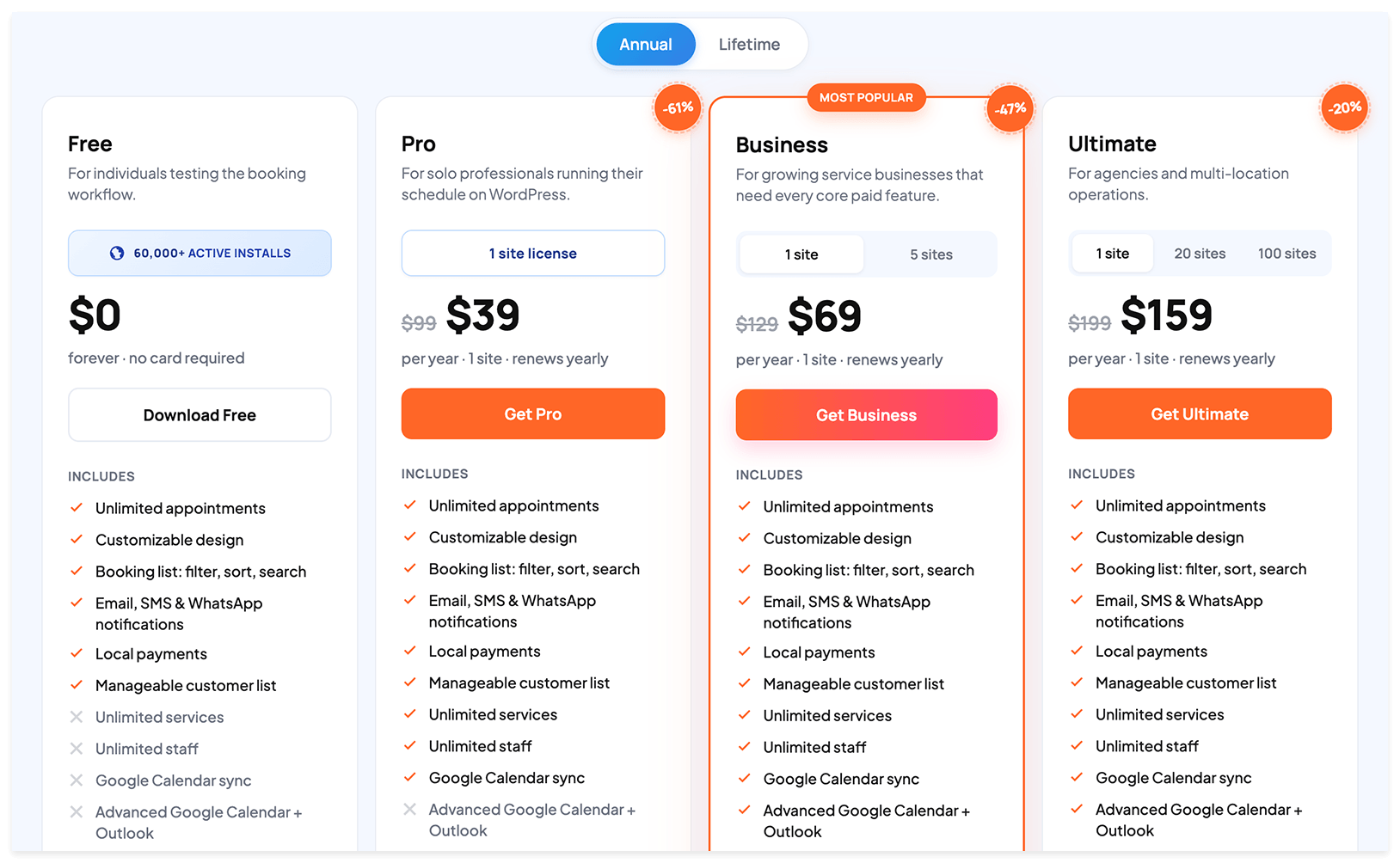
Pros:
- On WordPress.org since 2014 — 60,000+ active installs, 570 reviews × 4.4★ — the deepest WP-native review pool in this comparison, roughly 3.7× SSA’s 154 reviews
- Lifetime licensing on every paid tier (SSA does not offer lifetime — annual only, intro pricing year 1 only)
- Public multi-site packages. Running SSA Plus on 5 separate single-site subscriptions for 3 years costs roughly $1,785 ($99 intro + $129 × 2 renewals × 5 sites). Bookly Business 5-site lifetime is $249 promo / $349 regular, while Business 5-site annual is $129/yr promo / $249 regular
- Per-site license includes unlimited staff and services on that domain — SSA gates multi-staff scheduling to its top tier (Business $399/yr intro / $499/yr regular)
- Cloud-native unified billing for SMS, WhatsApp, and Stripe Connect — including Stripe Connect on Bookly Free via Bookly Cloud at a 0.9% application fee; SSA uses Twilio DIY for SMS
- 40+ add-ons available separately, with many bundled into Business and Ultimate tiers
- Native iOS and Android apps; plugin UI translated into 9 languages
Cons (honest):
- Marketing site is English only as of August 2026 (9-language multilingual site in preparation)
- Bookly’s depth means a longer ramp than SSA’s setup-wizard simplicity — for a solo consultant on one site, SSA’s “easy” wins on first-day UX
- Free tier is bounded at 5 services and 1 staff member
Verdict. If you are picking a WordPress-native alternative to Simply Schedule Appointments because you have hit the 1-site limit, need multi-staff depth, or want lifetime pricing instead of annual renewals at full regular price, Bookly is the clearest choice. The 12-year track record and 570-review pool give you confidence on edge cases that SSA’s smaller (but flawless) 154-review pool cannot yet match.
2. Amelia — Best for Design-Driven Sites
What we tested. Amelia Lite (free on WP.org) plus Standard tier ($89/yr promo, $99/yr regular) on the same sample WordPress 6.9 site. Same five-service, three-staff workflow with Stripe and Google Calendar sync.
Best for. Design-heavy sites where the booking interface is part of the brand expression. Amelia ships with several polished booking-form layouts that look good out of the box without theme overrides, and the Pro tier now covers 5 domains for agencies maintaining multiple client sites.
Pricing (verified on wpamelia.com, 11 June 2026). Free Lite on WP.org. Annual: Starter $49/yr (1 domain) · Standard $89/yr promo / $99/yr regular (1 domain) · Pro $149/yr promo / $199/yr regular (5 domains) · Elite $259/yr promo / $432/yr regular (unlimited domains). Lifetime: Standard $299 promo / $332 regular · Pro $449 promo / $561 regular · Elite $799 promo / $1,332 regular.
Pros:
- Strongest visual booking forms out of the box of any plugin in this comparison
- Solid event-booking flow in parallel to appointments (broader scope than SSA’s single-appointment focus)
- WhatsApp support via Meta Cloud API on Pro and above (since August 2022)
- 90K+ active installs and an active marketing presence in English, Spanish, and German
Cons:
- Plugin UI is translated into 3 languages — narrower than Bookly’s 9
- Gift Cards are not available today (vendor roadmap notes Q3 2026)
- Pricing display leans heavily on limited-time discount anchors across annual and lifetime tiers
- Smaller review pool than Bookly on WordPress.org
Verdict. If your booking page is part of the brand and you want it to feel polished without manual styling, Amelia is the strongest design-out-of-box pick. For maximum review depth and a lower lifetime entry, Bookly remains the safer choice; for solo simplicity, SSA still wins.
3. Booknetic — Best for SaaS / Agency Multi-Tenant
What we tested. Booknetic Standard tier purchased via CodeCanyon, installed on the sample WordPress 6.9 site. Same five-service, three-staff workflow with Stripe.
Best for. Agencies launching a multi-tenant booking SaaS under their own brand using Booknetic’s SaaS tier, or operators who specifically need native iOS/Android apps plus a Discord community channel.
Pricing (verified on booknetic.com, 3 June 2026). Distributed via CodeCanyon, not WordPress.org. Standalone annual: Basic $45/yr promo / $89 regular · Standard $99/yr / $199 regular · Premium $199/yr / $399 regular · Elite $299/yr / $599 regular. Standalone lifetime: Basic $99 / $199 regular · Standard $239 / $399 regular · Premium $599 / $799 regular · Elite $899 / $1,599 regular. SaaS multi-tenant: Starter $499/yr ($999 lifetime), Ultimate $1,199/yr ($2,399 lifetime), Infinity $1,999/yr ($3,399 lifetime).
Pros:
- Native iOS and Android apps (Bookly also has both — but if you came from SSA, this is an upgrade in either direction)
- Multi-tenant SaaS resell tier ready for agencies launching their own booking platform
- Active Discord community (the only plugin in this list with one)
- Fully localized marketing site in English, Spanish, and German with proper hreflang
Cons:
- Not on WordPress.org — CodeCanyon-only distribution means no one-click wp-admin install and no auto-updates through the standard WordPress updater
- Trustpilot shows a bimodal pattern (3.4★ across 21 reviews, with 43% 5-star and 43% 1-star) — a love-or-hate distribution worth pressure-testing on free trial
- Permanent “Save 50%” anchor on every standalone tier; transparent buyers may want to compare against the regular price
Verdict. If you specifically need a multi-tenant SaaS resell tier or a Discord community channel, Booknetic is the more capable choice. For most SSA users moving to WordPress-native, the lack of a WP.org listing and the bimodal review pattern weigh against it.
4. LatePoint — Best for Brainstorm Force Stack Users
What we tested. LatePoint Free on WP.org plus Starter tier ($79/yr promo) on the sample WordPress 6.9 site. Same workflow with the Astra theme and Spectra blocks active.
Best for. Operators already running Astra theme, Spectra blocks, or building sites with ZipWP — LatePoint is integrated more cleanly into that stack than any other plugin in this list because the same parent company (Brainstorm Force) holds a strategic investment in it.
Pricing (verified on latepoint.com, 2 June 2026). Free version on WordPress.org with the core booking flow. Annual: Starter $79/yr promo / $99/yr regular (1 site) · Scale $149/yr promo / $249/yr regular (5 sites) · Agency $299/yr promo / $499/yr regular (100 sites). Lifetime: Starter $199 promo / $249 regular · Scale $399 promo / $599 regular · Agency $599 promo / $1,299 regular (split-payable as 11 × $59.99).
Pros:
- All plans include all features — domain count is the only differentiator
- Clean Brainstorm Force ecosystem integration (Astra, Spectra, ZipWP)
- Lifetime tier at every paid level, including a 100-site Agency lifetime
- Fast WordPress.org growth (~100K active installs in roughly 15 months since launch)
Cons:
- WordPress.org listing is only 15 months old as of publication — review pool is smaller than Bookly or Amelia
- Free tier supports Stripe only for payments; PayPal and other processors are Pro-gated
- Marketing presence is English-first; plugin UI has partial coverage across 5 locales
Verdict. If you are already on the Brainstorm Force stack, LatePoint is the natural pick. Outside that ecosystem, Bookly’s longer track record and broader payment processor support on Free usually win.
5. BookingPress — Best for Lightweight Installs (with WordPress.org caveat)
What we tested. BookingPress Standard ($89/yr) installed directly from the vendor on a fresh WordPress 6.9 site, with a small-business profile.
Best for. Operators who want a lightweight booking install and are comfortable installing and updating outside the WordPress.org channel.
Pricing. Standard $89/yr or $229 lifetime · Professional $139/yr or $379 lifetime (up to 3 sites) · Enterprise $249/yr or $599 lifetime (up to 20 sites). 20+ payment gateways. Marketing site available in English, French, German, Spanish, and Portuguese.
Pros:
- Lightweight footprint at default settings
- Broad payment-gateway coverage (20+)
- Lifetime available at every paid tier — the entry lifetime ($229) is one of the cheaper paid lifetimes in this list
Cons:
- Closed on WordPress.org since 1 February 2025 following a Guideline Violation. The plugin still functions on sites where it is already installed, but the WP.org listing no longer receives updates or official support through that channel — installs and updates now happen via the vendor site only. This is the single most important fact to consider before switching to or from BookingPress
- Smaller review presence than Bookly, Amelia, or SSA on third-party review sites
- Less established add-on ecosystem than the larger WP-native plugins
Verdict. BookingPress can still be a reasonable lightweight pick for a single small site, but the WordPress.org channel closure since February 2025 is a real consideration — if WP.org one-click install and standard auto-updates matter to you, Bookly or Amelia are the safer routes.
6. FluentBooking — Best for FluentCRM Ecosystem Users
What we tested. FluentBooking Free on WP.org plus Solo tier ($63/yr promo) on the sample WordPress 6.9 site with FluentCRM installed and connected.
Best for. Operators who already use FluentCRM (or plan to). FluentBooking is built by the WPManageNinja team and integrates more deeply with FluentCRM than any other plugin in this list — the automation handoff is the smoothest.
Pricing (verified on fluentbooking.com, 5 June 2026; promo code NINJASURPRISE20 was live at the time of writing). Solo $63/yr promo / $79/yr regular · Lifetime $199 / $249 regular (1 site). Small Business $159/yr / $199 regular · Lifetime $349 / $436 regular (5 sites). Agency $319/yr / $399 regular · Lifetime $599 / $749 regular (50 sites; lifetime split-payable as 8 × $81).
Pros:
- Tightest FluentCRM integration in the category
- Modern UI on a newer codebase
- All paid tiers include all features
- Free tier on WP.org with genuine booking functionality
Cons:
- Newer entrant (~2 years on market) — smaller review pool than Bookly or Amelia
- Best value primarily inside the FluentCRM ecosystem; outside it, the differentiation is thinner
- No money-back guarantee visible on the pricing page at time of writing
Verdict. If you are already on FluentCRM, FluentBooking is the natural pick because nothing else integrates as cleanly. Outside that ecosystem, Bookly’s maturity or SSA’s onboarding simplicity usually win.
7. Calendly — Best Off-WordPress SaaS Scheduler
What we tested. Calendly Free plus Standard ($10/seat/month annual) embedded in a WordPress page via the official embed snippet. Ran 30 days of solo meeting booking and a small team round-robin.
Best for. Individual schedulers and small teams who do not actually need a WordPress booking plugin — they need a meeting scheduler that happens to be embeddable on a WordPress page. If your use case is “I want clients to book a 30-minute call with me”, Calendly is the honest pick over any plugin in this comparison.
Pricing. Free for one user. Standard $10/month billed annually ($120/seat/year) · Teams $16/month billed annually ($192/seat/year) · Enterprise custom. SMS add-on $3/month. Hosted in the US on AWS — for EU operators, customer data crosses the Atlantic.
Pros:
- Best-in-class scheduling UX for individuals and small teams
- Deep enterprise integration coverage (Salesforce, HubSpot, Microsoft, LinkedIn, Zoom)
- G2 Leader tier with 4.7★ across 2,615 reviews — the deepest SaaS review pool in this list
- No WordPress maintenance overhead
Cons:
- Not a WordPress plugin — embed-only, all scheduling logic lives on calendly.com
- Per-seat pricing compounds for teams: 3 staff on Teams = $1,728 over 3 years; 10 staff = $5,760
- No native service catalog, no staff calendar, and no in-WordPress payment flow
- On cancellation, access ends at the billing cycle close and data is deleted after a 30-day grace window — export CSV before that window
Verdict. If you are a SSA user who realized you do not actually need WordPress for booking, Calendly is the honest pick. For service-business workflows that need to live inside WordPress (services, staff, deposits, packages), stay WordPress-native — Bookly is built for exactly that surface.
8. Acuity Scheduling — Best for Squarespace-Adjacent Businesses
What we tested. Acuity Starter ($16/month annual) embedded on the sample WordPress site via iframe.
Best for. Operators already on Squarespace (Acuity is now a Squarespace product), or businesses where the booking page is the primary marketing surface and the WordPress site is secondary.
Pricing. Starter $20/month or $16/month annual ($192/yr) · Standard $34/month or $27/month annual ($324/yr) · Premium $61/month or $49/month annual ($588/yr). 7-day trial via signup; no free plan; no lifetime option.
Pros:
- Long market presence (Acuity launched in 2006)
- G2 4.8★ across 5,728 reviews — the highest SaaS review count in this category
- Deep integration with Squarespace if you are in that ecosystem
- Hosted, with no WordPress maintenance overhead
Cons:
- Not a WordPress plugin — embed only
- Subscription-only pricing, no lifetime option
- Most differentiation lives inside the Squarespace ecosystem
- Steepest paid entry of the SaaS group at the Premium tier
Verdict. Acuity is the right pick if you are already on Squarespace or want a hosted scheduler with a long track record. For WordPress-first operators, the embed model loses to native plugin integration on conversion and customization.
9. Setmore — Best Free SaaS for Small Businesses
What we tested. Setmore Free (4 users, 200 appointments/month) and Pro ($5/user/month annual) embedded on the sample WordPress page.
Best for. Solo operators or four-person teams that want a genuinely free SaaS scheduler with WordPress embed support. Setmore’s free tier is one of the more usable free SaaS tiers in this category — not a 14-day trial dressed up as Free.
Pricing. Free for up to 4 users and 200 appointments/month. Pro $5/user/month annual or $12/user/month monthly (~58% annual discount). Live Receptionist HIPAA add-on $99/month. 24/7 phone support included.
Pros:
- Generous free tier — actually free, not a feature-gated trial
- Inexpensive paid tier ($5/user/month annual)
- 24/7 human phone support
- G2 4.5★ across 268 reviews and Capterra 4.6★ across 958 reviews
Cons:
- Not a WordPress plugin — embed only
- Less feature depth at paid tiers than Calendly or Acuity
- Pro pricing compounds per seat once you scale beyond 4 users on Free
Verdict. Setmore is the pick for solo operators or very small teams who want a free SaaS scheduler with a WordPress embed and decent phone support. For service-business workflows that need to live inside WordPress, a native plugin (Bookly, Amelia, or SSA) is the better fit.
When Simply Schedule Appointments Is Actually the Better Choice
Not every SSA user should switch. SSA holds a 100% positive WordPress.org rating (152 × 5★ + 1 × 4★ + 1 × 3★ across 154 reviews) and a setup wizard widely cited as one of the cleanest in the category — and there are four scenarios where SSA is the more honest fit.
You are a solo consultant on one WordPress site and value the 100% positive review record
SSA earned every one of those reviews on solo and small-business use. If you are a coach, therapist, tutor, or independent consultant taking bookings on a single WordPress site, you are squarely in SSA’s target audience. The 1-site license is not a constraint for you — it is the model. Stay.
Accessibility is a hard requirement
SSA actively positions on accessibility (WCAG-forward design, screen-reader-friendly setup) and is regularly cited by users with assistive-technology setups as one of the smoother experiences in the category. If accessibility is a non-negotiable requirement for your audience, that is a real reason to choose SSA over a generalist plugin.
You want minimal UI and quick setup, and you do not need multi-staff or multi-location
SSA’s setup wizard is intentionally narrow — services, availability, calendar, done. If your workflow does not need multi-staff scheduling, multi-location resource management, deposits, or Gift Cards, that narrower scope is a feature, not a gap. Bookly and Amelia have more surface area; if you do not need it, you do not need to pay for it or learn it.
You are scheduling-only and do not need integrated payments, Gift Cards, or Cloud services
SSA Plus and Professional give you the scheduling layer cleanly. If your payment flow lives elsewhere (an external invoicing tool, a separate checkout, or in-person), and you do not need SMS at the volume that justifies a Cloud account, SSA fits.
How Does the Pricing Compare? (TCO Snapshot)
A direct three-year tier-mapped comparison, single site, using SSA introductory pricing for year 1 and regular renewal pricing for years 2 and 3.
| Tier mapping | SSA (annual, 3 yrs) | Bookly annual (3 yrs) | Bookly lifetime (one-time) |
|---|---|---|---|
| Plus / Pro | $99 + $129 + $129 = $357 | $39 × 3 = $117 | $99 promo / $129 regular |
| Professional / Business | $199 + $249 + $249 = $697 | $69 × 3 = $207 | $129 promo / $149 regular |
| Business / Ultimate | $399 + $499 + $499 = $1,397 | $159 × 3 = $477 | $199 promo / $299 regular |
Three observations from the table:
- No lifetime path on SSA. Bookly Pro lifetime ($99 promo / $129 regular) is lower than SSA Plus over a single renewal cycle. On year 3, you have saved at least $228 vs SSA Plus using Bookly Pro regular lifetime ($129 vs SSA Plus 3-year annual $357), and $1,098 vs SSA Business using Bookly Ultimate 1-site regular lifetime ($299 vs SSA Business 3-year annual $1,397) — and you own the license going forward.
- Annual-to-annual, Bookly is cheaper at every tier mapping. $60-$90/year less at Plus/Pro, $130-$180/year less at Professional/Business, and $240-$340/year less at Business/Ultimate, depending on whether you compare intro or regular renewal pricing.
- The 5-site math is the biggest swing. SSA charges per single-site subscription with no multi-site bundle. Running SSA Plus on 5 sites for 3 years costs roughly $1,785 ($99 intro + $129 × 2 renewals × 5 sites). Bookly Business 5-site lifetime is $249 promo / $349 regular, and Bookly Business 5-site annual is $129/yr promo / $249 regular.
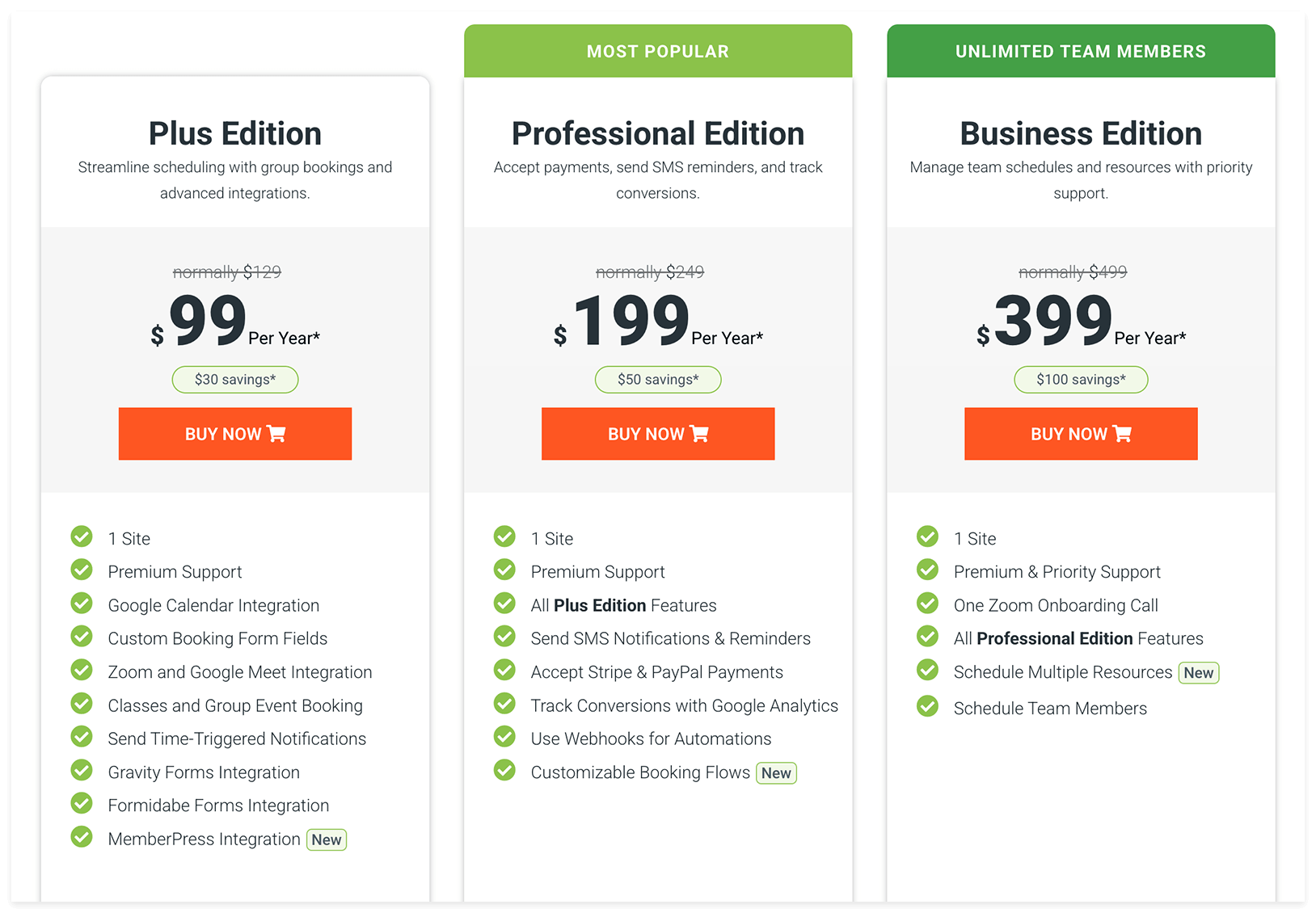
Per-site license footnote. Bookly is a per-site license: one license covers one WordPress domain with unlimited staff and services on that domain. If you operate multiple WordPress sites, use the published site-count packages on Bookly’s pricing page: Pro 1 site, Business 1 or 5 sites, and Ultimate 20 or 100 sites. SSA’s tiers are single-site, with no multi-site bundle option.
For agencies running booking on many WordPress sites, the clean public anchor is Bookly’s published package model: Business covers 5 sites, while Ultimate covers 20 or 100 sites. The strongest single Bookly story vs SSA is still the 1-site lifetime ($99 promo / $129 regular on Pro) vs SSA’s $99 introductory / $129 regular annual with no lifetime option at all.
How to Migrate from Simply Schedule Appointments to Bookly
Bookly’s built-in Import appointments feature (found under Bookly → Diagnostics → Import appointments) handles the data transfer from a CSV file — staff, services, customers, appointments, and prices. Back up your WordPress database before you start; Bookly supports same-session rollback, but a database backup is your safety net if you close the browser.
Step 1 — Export your Simply Schedule Appointments data
Export your existing SSA appointments as a CSV from the SSA admin (see SSA’s official export documentation for the exact menu path on your version). Confirm your CSV contains, at minimum, appointment start and end dates (or duration), service name, staff name (if multi-staff), customer name / email / phone, price, and status. Note your working-hours, blackout-date, and notification-template settings separately — those are reapplied manually in Bookly after import.
Step 2 — Install Bookly and upload the CSV
Install Bookly from WordPress.org (Free) or upload your paid license. Navigate to Bookly → Diagnostics → Import appointments, click Choose file, and upload the SSA export. Bookly creates new staff, services, and customers, reuses existing records to prevent duplicates, calculates service duration from start/end times if duration is missing, and does not send booking notifications during import.
Step 3 — Map CSV columns and run the import
Map each CSV column to the corresponding Bookly field. Required fields are starred:
| Bookly field | Map from SSA export column |
|---|---|
| Start Date * | appointment_start / start_date |
| End Date / Duration * | end_date or duration_minutes |
| Service Name * | appointment_type / service_name |
| Staff Name | staff_name (or default staff if SSA was solo) |
| Price | price (numeric) |
| Customer Name / Email / Phone | customer_name / customer_email / customer_phone |
| Status | status (Approved, Pending, Cancelled) |
Click Import. Bookly shows a summary on completion. If something is off end-to-end, click Rollback to delete all records from the import session.
Step 4 — Reconnect calendars, recreate notifications, replace shortcodes
Imported appointments do not sync to external calendars automatically. Reconnect Google Calendar or Outlook for each staff member under Bookly → Staff Members → [staff name]. Recreate any SSA-side email or SMS notifications inside Bookly. Replace SSA shortcodes with Bookly’s [bookly-form] shortcode.
If you would like a second pair of eyes on the migration, contact our team about migration help.
Read the full migration guide →
Frequently Asked Questions
What is the best Simply Schedule Appointments alternative for WordPress in 2026?
For most WordPress service businesses, the best Simply Schedule Appointments alternative is Bookly — 12 years on WordPress.org, 60,000+ active installs, 570 reviews × 4.4 stars, $99 lifetime promo / $129 regular on the Pro tier, and public multi-site packages for 5, 20, and 100-site portfolios. For design-driven sites, Amelia is the strongest visual pick. For SaaS / multi-tenant resell, Booknetic is the more capable choice. Pick by scenario, not by blanket recommendation.
Is Simply Schedule Appointments free?
Yes — partially. SSA has a free Basic tier on WordPress.org with the setup wizard, unlimited appointment types, WordPress user integration, blackout dates, and basic email notifications. Paid features such as Google Calendar sync, Zoom / Google Meet integration, group / class booking, time-triggered notifications, SMS via Twilio, payments via Stripe and PayPal, webhooks, and multi-staff scheduling are gated to Plus ($99/yr introductory, $129/yr regular), Professional ($199 / $249), and Business ($399 / $499) tiers.
Does Simply Schedule Appointments offer a lifetime license?
No. Simply Schedule Appointments tiers are annual-only — there is no lifetime option on any tier. Introductory pricing applies for year 1, and renewals revert to the regular price (for example, Plus is $99 year 1 and $129 every year after). Bookly, Amelia, Booknetic, LatePoint, BookingPress, and FluentBooking all offer a lifetime tier; among major WP-native booking plugins in 2026, SSA stands alone as annual-only.
Why do people switch from Simply Schedule Appointments?
The three switching reasons we see most often are (1) hitting the 1-site license when adding a second WordPress site, (2) wanting a lifetime tier instead of paying full regular price every renewal year, and (3) needing multi-staff scheduling without buying SSA’s Business tier ($399/yr introductory, $499/yr regular). Bookly addresses all three: lifetime is available on every paid tier, public multi-site packages cover 5, 20, and 100-site portfolios, and unlimited staff and services are included on every Bookly per-site license starting from Pro.
Is Bookly cheaper than Simply Schedule Appointments?
At every comparable tier and time horizon, yes. Annual to annual: Bookly Pro is $39/yr promo / $99 regular vs SSA Plus $99/yr introductory / $129/yr regular. Three-year TCO: Bookly Pro lifetime $99 promo / $129 regular vs SSA Plus 3-year annual $357 — at least a $228 saving using the regular lifetime price. Multi-site: Bookly Business 5-site lifetime is $249 promo / $349 regular vs SSA Plus on 5 separate single-site subscriptions for 3 years at roughly $1,785.
Can I migrate my Simply Schedule Appointments appointments to Bookly?
Yes. Export your SSA appointments as a CSV from the SSA admin, then in Bookly go to Bookly → Diagnostics → Import appointments and upload the CSV. Bookly creates staff, services, customers, and appointments, prevents duplicates, and offers a same-session rollback. Reconnect calendars and recreate any SMS / email notification templates after import. The full step-by-step is in the migration section above.
What is Simply Schedule Appointments’ refund policy?
Simply Schedule Appointments offers a 30-day money-back guarantee on paid tiers. There is no free trial of a paid tier — instead, the free Basic tier is the trial. Renewals are annual; the introductory price applies for year 1 and renewals revert to the regular price.
Does Simply Schedule Appointments work for multi-staff teams?
Partially. Team-member scheduling (multiple staff with individual calendars) is gated to the Business tier — $399/yr introductory, $499/yr regular. Plus and Professional tiers are positioned for solo and small-business use. If multi-staff scheduling is core to your workflow, Bookly includes unlimited staff and services per site starting at Pro ($39/yr promo / $99 regular, or $99 lifetime promo / $129 regular) — a meaningfully lower entry for the same capability.
Is Simply Schedule Appointments on WordPress.org?
Yes — SSA is listed on WordPress.org as simply-schedule-appointments with 60K+ active installs, 154 reviews at a 5.0 average (152 × 5★ + 1 × 4★ + 1 × 3★, zero 2-star or 1-star), and an active changelog. For reference, Bookly has been on WordPress.org since 2014 with 60,000+ active installs and 570 reviews × 4.4 stars.
Which Simply Schedule Appointments alternative is closest to SSA’s “easy” feel?
If you specifically want SSA’s narrow, setup-wizard-first feel in another tool, Setmore is the closest SaaS analogue (genuinely free, fast setup), and FluentBooking Solo is the closest WP-native analogue if you also use FluentCRM. Bookly Free is broader in scope but has a steeper initial setup; if “easy” is the top criterion and you do not need Bookly’s depth, SSA itself is hard to beat — which is exactly why our “When SSA Is the Better Choice” section above exists.
Verdict — Which Simply Schedule Appointments Alternative Should You Pick?
After 30 days of side-by-side testing across nine alternatives and an updated Bookly / SSA pricing snapshot from August 2026, the best Simply Schedule Appointments alternative answer is scenario-based, not a blanket recommendation.
Pick Bookly if…
- You want a WordPress-native plugin with 12 years of WP.org track record vs SSA’s 8
- You value a 570-review pool at 4.4 stars for confidence on edge cases
- You prefer transparent lifetime pricing from $99 promo / $129 regular on Pro, with Business and Ultimate lifetime packages for 1, 5, 20, and 100-site needs, over annual-only renewals
- You run booking on multiple WordPress sites and want a published package for 5, 20, or 100 sites
- You need unlimited staff and services per site starting at the entry paid tier, not gated to a top tier
Pick Amelia if…
- Your booking page is part of the brand and you want polished visual booking forms out of the box
- You need event-booking alongside appointment scheduling
- You are building on a design-driven site (Elementor, Divi, Bricks) and want native styling
Pick Booknetic if…
- You are launching a multi-tenant booking SaaS and want the resell tier ready now
- You need a fully localized Spanish or German marketing site today
- You are comfortable with CodeCanyon distribution instead of WordPress.org one-click install
Pick LatePoint if…
- You are already on the Brainstorm Force ecosystem (Astra theme, Spectra blocks, ZipWP)
- You want a 100-site Agency lifetime ($599 promo) at the top tier
- You only need Stripe for payments on the Free tier
Stick with Simply Schedule Appointments if…
- You are a solo consultant on one WordPress site and value the 100% positive review record
- Accessibility is a hard requirement for your audience
- You want minimal UI and quick setup and do not need multi-staff, multi-location, or Cloud services
- You are scheduling-only and your payment flow lives outside the booking plugin
Hybrid approach: use different tools for different sites
For agencies running mixed portfolios, the practical answer can be more than one tool. Default new WordPress builds to Bookly for the long track record, lifetime pricing, and published multi-site packages. Keep SSA on a flagship single-consultant site where the accessibility narrative and 100% positive review record are part of the trust story. Use Calendly or Acuity for clients whose use case is actually just meeting scheduling, not WordPress booking.
Still weighing the Simply Schedule Appointments alternatives decision? Start with the free Bookly plugin on WordPress.org, run it on one site for two weeks, and benchmark against your current SSA install before committing either way.