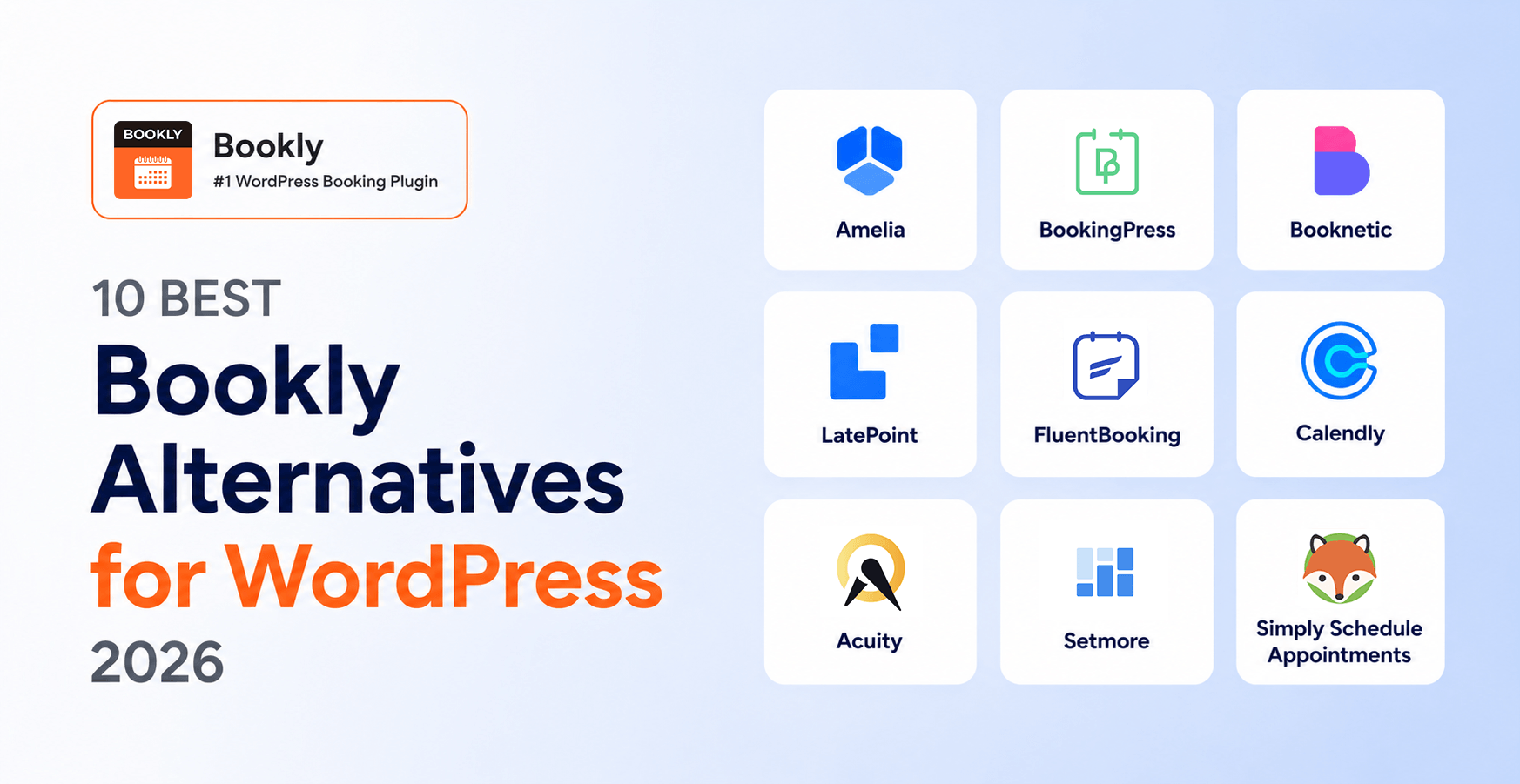
10 Best Bookly Alternatives for WordPress in 2026 (Honest Comparison)
If you arrived here searching for bookly alternatives, you are probably in one of two camps: you already use Bookly and want to know whether anything else is genuinely better for your situation, or you are comparison-shopping before buying and want to see how Bookly stacks up against the rest of the WordPress booking field. This is an unusual article for us to publish — we are the team behind Bookly — so we want to be upfront about one thing: when Bookly is the strongest fit, we will say so, and when it isn’t, we will say that too. There are honest scenarios where Amelia, Calendly, Setmore, or Salon Booking System will serve you better.
We installed each of the 10 alternatives below on a test WordPress 6.9 site and ran the same service-business booking workflow — five services, three staff, Stripe + WooCommerce, 30 sample bookings — between February and April 2026. Bookly pricing was re-verified on booking-wp-plugin.com/pricing on August 13, 2026; competitor pricing follows the vendor check dates noted in each section. Below: the comparison table at a glance, ten per-plugin verdicts, three scenarios where specific competitors are actually the better choice, a migration walkthrough if you decide to switch to Bookly, and a long FAQ.
- Bookly is the most-installed mature WordPress booking plugin in this list — 12+ years on WP.org (since 2014), 60,000+ active installs, 4.4★ across 570 reviews, and Pro from $39/yr promo / $99 regular, or $99 lifetime promo / $129 regular. Strongest default pick for WordPress service businesses.
- For design-driven sites where the booking form is part of the brand expression, Amelia (from $49/yr Starter; Standard $89/yr promo, lifetime from $299) ships the most polished forms out of the box.
- For multi-tenant SaaS resell under your own brand, only Booknetic in this list ships that tier today ($499–1,999/yr SaaS).
- For off-WordPress meeting scheduling (1-on-1 calls, not service-business workflows), Calendly or Acuity are honest picks — neither is a WordPress plugin.
Methodology. We tested all 10 plugins across three sample WordPress installations between February and April 2026. Bookly pricing was re-verified on booking-wp-plugin.com/pricing on August 13, 2026; competitor pricing follows the vendor check dates noted in each section.
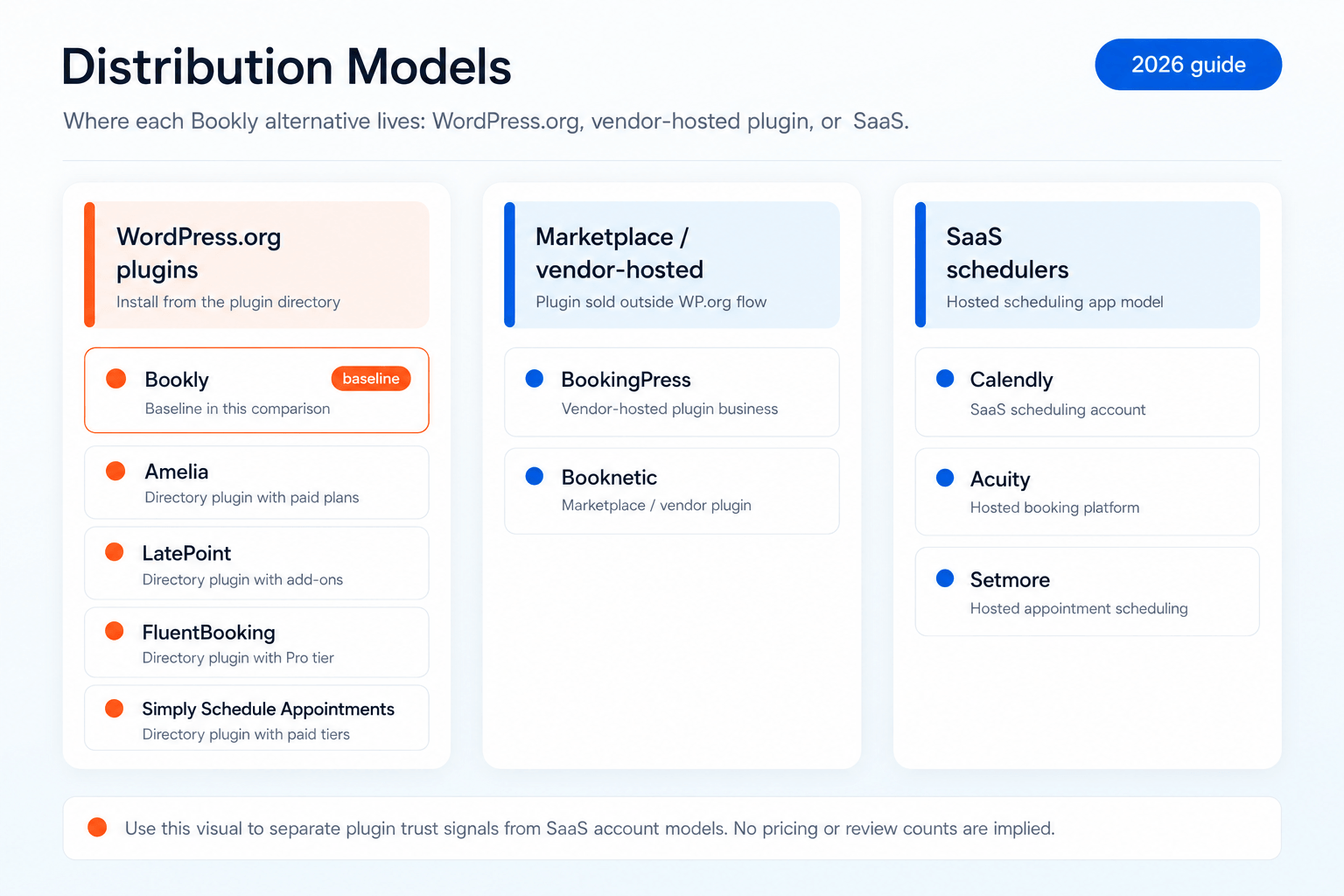
Quick Comparison Table — 10 Best Bookly Alternatives at a Glance
| # | Plugin | Best for | Starting price | Free | On WP.org | WP.org rating | Years on market |
|---|---|---|---|---|---|---|---|
| 1 | Bookly | Best Overall WordPress-Native | $39/yr promo / $99 regular; $99 lifetime promo / $129 regular | Yes | Yes | 4.4★ (570 reviews) | 12+ (since 2014) |
| 2 | Amelia | Design-driven sites | $49/yr Starter | Yes | Yes | 4.4★ | 6+ |
| 3 | BookingPress | Many payment gateways | $89/yr Standard | Yes (limited) | No (closed Feb 1, 2025) | 4.7★ (last snapshot) | 5+ |
| 4 | Booknetic | Mobile-first / agency SaaS | $45/yr (promo) | No | No (CodeCanyon only) | n/a (4.6★ CodeCanyon) | 7 |
| 5 | LatePoint | Brainstorm Force ecosystem | $79/yr Starter intro | Yes | Yes | 4.9★ (80 reviews) | ~2 (since Jan 2025) |
| 6 | FluentBooking | FluentCRM ecosystem | $63/yr Solo (promo) | Yes | Yes | 4.7★ | ~2 (newer entrant) |
| 7 | Calendly | Off-WP individual scheduling | $10/seat/mo | Yes | No (SaaS, embed only) | n/a (G2 4.7★ × 2,615) | 12+ |
| 8 | Acuity (Squarespace) | Squarespace-adjacent businesses | $20/mo Starter | No | No (SaaS) | n/a (G2 4.7★) | 15+ |
| 9 | Setmore | Free SaaS for solo / 2-person teams | $0 (1 user) | Yes | No (SaaS) | n/a | 13+ |
| 10 | Simply Schedule Appointments | Solo consultants & first-time WP booking setup | $99/yr Plus | Yes | Yes | 4.8★ | 8+ |
Bookly pricing re-verified August 13, 2026; competitor pricing follows the vendor check dates noted in each section. Bookly baseline for comparison: 4.4★ across 570 WP.org reviews, 60,000+ active installs, listing live since October 10, 2014.
1. Bookly — Best Overall WordPress-Native Booking Plugin
What we tested. Bookly Free on WP.org plus Bookly Pro on a test WordPress 6.9 site. Configured five services, three staff, Stripe + WooCommerce, ran 30 sample bookings.
Best for. Established WordPress service businesses and agencies that want a mature, battle-tested plugin with a deep review pool and flexible annual or lifetime pricing. The 12-year track record is the longest in this list, and the 570-review WordPress.org pool is the deepest among WP-native options.
Pricing. Free on WordPress.org (up to 5 services, 1 staff member). Pro, 1 site: $39/yr promo / $99 regular, or $99 lifetime promo / $129 regular. Business: $69/yr promo / $129 regular or $129 lifetime promo / $149 regular for 1 site; $129/yr promo / $249 regular or $249 lifetime promo / $349 regular for 5 sites. Ultimate: $159/yr promo / $199 regular or $199 lifetime promo / $299 regular for 1 site; $249/yr promo / $499 regular or $499 lifetime promo / $999 regular for 20 sites; $299/yr promo / $699 regular or $699 lifetime promo / $1,299 regular for 100 sites. Bookly Cloud includes a $5 signup credit and up to $400 bonus on the first top-up.
Pros:
- 12+ years on WordPress.org (live since October 10, 2014) — longest track record in this list
- 3.5M+ cumulative downloads, 60,000+ active installs, 4.4★ across 570 reviews — deepest review pool of any WP-native plugin here
- Flexible annual and lifetime pricing across 1-site, 5-site, 20-site, and 100-site packages
- Free tier on WP.org; Stripe Payments are available through Bookly Cloud with a 0.9% application fee
- Native iOS + Android mobile apps for staff
- Unified Cloud billing — SMS, WhatsApp (BYOA via Meta Cloud API), and Stripe Payments / Stripe Connect under one biller
- Plugin UI translated into 9 languages
Cons:
- Marketing site is English only as of August 2026 (9-language multilingual site in preparation)
- Free tier limits — 5 services, 1 staff member — narrower than Amelia Lite or LatePoint Free
- No multi-tenant SaaS resell tier (unlike Booknetic SaaS)
Verdict. If you are picking a WordPress-native booking plugin for a service business and value 12+ years of maturity, a deep review pool, and flexible annual/lifetime pricing, Bookly is the clearest default pick. The places where it loses honestly are listed in the «When [Competitor] Is the Better Choice» sections later in this article.
2. Amelia — Best for Design-Driven Sites
What we tested. Amelia Lite (free on WP.org) plus Standard tier ($89/yr promo, $99/yr regular) on the same WordPress 6.9 test site. Same five-service, three-staff workflow.
Best for. Design-heavy sites where the booking interface is part of the brand expression. Amelia ships with several modern booking-form layouts that look polished out of the box without theme overrides.
Pricing. Free (Lite on WP.org). Starter $49/yr (1 domain). Standard $89/yr promo / $99/yr regular (1 domain), or $269 lifetime promo / $339 regular. Pro $199/yr promo / $285/yr regular (5 domains), or $449 lifetime promo / $649 regular. Elite $339/yr promo / $679/yr regular (unlimited domains), or $899 lifetime promo / $1,799 regular. (Verified wpamelia.com, July 13, 2026.)
Pros:
- Strongest visual booking forms out of the box of any plugin in this list
- Solid event-booking flow (parallel to appointments)
- Pro tier now covers 5 domains — strong fit for small agencies
- Lifetime now available across Standard / Pro / Elite, not Elite-only
- WhatsApp integration via Meta Cloud API on Pro+
Cons:
- Smaller WordPress.org review pool than Bookly (~90K active installs at 4.4★, but a narrower review base)
- Gift Cards not available today (vendor roadmap Q3 2026)
- White-label / agency tier not available
- Marketing site EN only; plugin UI in 3 languages
Verdict. If your booking page is part of the brand and you want it to feel polished without manual styling, Amelia is the strongest design-out-of-box choice. For broader feature depth on advanced workflows or for the deeper review pool, Bookly typically edges ahead.
3. BookingPress — Best for Many Payment Gateways
What we tested. BookingPress (last version available before WP.org closure) installed on a fresh WordPress 6.9 site, plus Standard tier ($89/yr). Same workflow.
Best for. Single-location small businesses that need to accept many payment methods natively (BookingPress ships with 20+ payment gateway integrations). Important caveat: BookingPress was removed from WordPress.org on February 1, 2025 — no automatic updates through the standard WP updater, no one-click install. New purchases and updates are vendor-hosted only.
Pricing. Standard $89/yr / $229 lifetime. Professional $139/yr / $379 lifetime. Enterprise $249/yr / $599 lifetime. (Verified bookingpressplugin.com, June 7, 2026.)
Pros:
- 20+ payment gateways out of the box — widest payment support in this list
- 20+ payment gateways available from the $89/yr Standard tier
- Active vendor support and roadmap continues despite WP.org removal
Cons:
- Not on WordPress.org since February 1, 2025 — no auto-updates through wp-admin, manual upload required for each release
- Smaller community and ecosystem than Bookly or Amelia
- Less feature depth on advanced workflows (deposits, packages, complex group bookings)
- No mobile apps
Verdict. If accepting many payment methods is your primary need and you are comfortable handling plugin updates manually after the WP.org closure, BookingPress earns the slot. For most WordPress operators who value one-click install and auto-updates, the WP.org closure tilts this decision toward Bookly or Amelia.
4. Booknetic — Best for Mobile-First / Agency SaaS
What we tested. Booknetic Standard tier purchased via CodeCanyon, installed on the same WordPress 6.9 site. Ran the same five-service, three-staff workflow.
Best for. Agencies launching a multi-tenant booking SaaS under their own brand using the Booknetic SaaS tier (Starter $499/yr, Ultimate $1,199/yr, Infinity $1,999/yr; lifetime Starter $999, Ultimate $2,399, Infinity $3,399 — verified booknetic.com/saas/pricing, June 7, 2026). Also a fit for operators who specifically want native iOS + Android apps and an active Discord community.
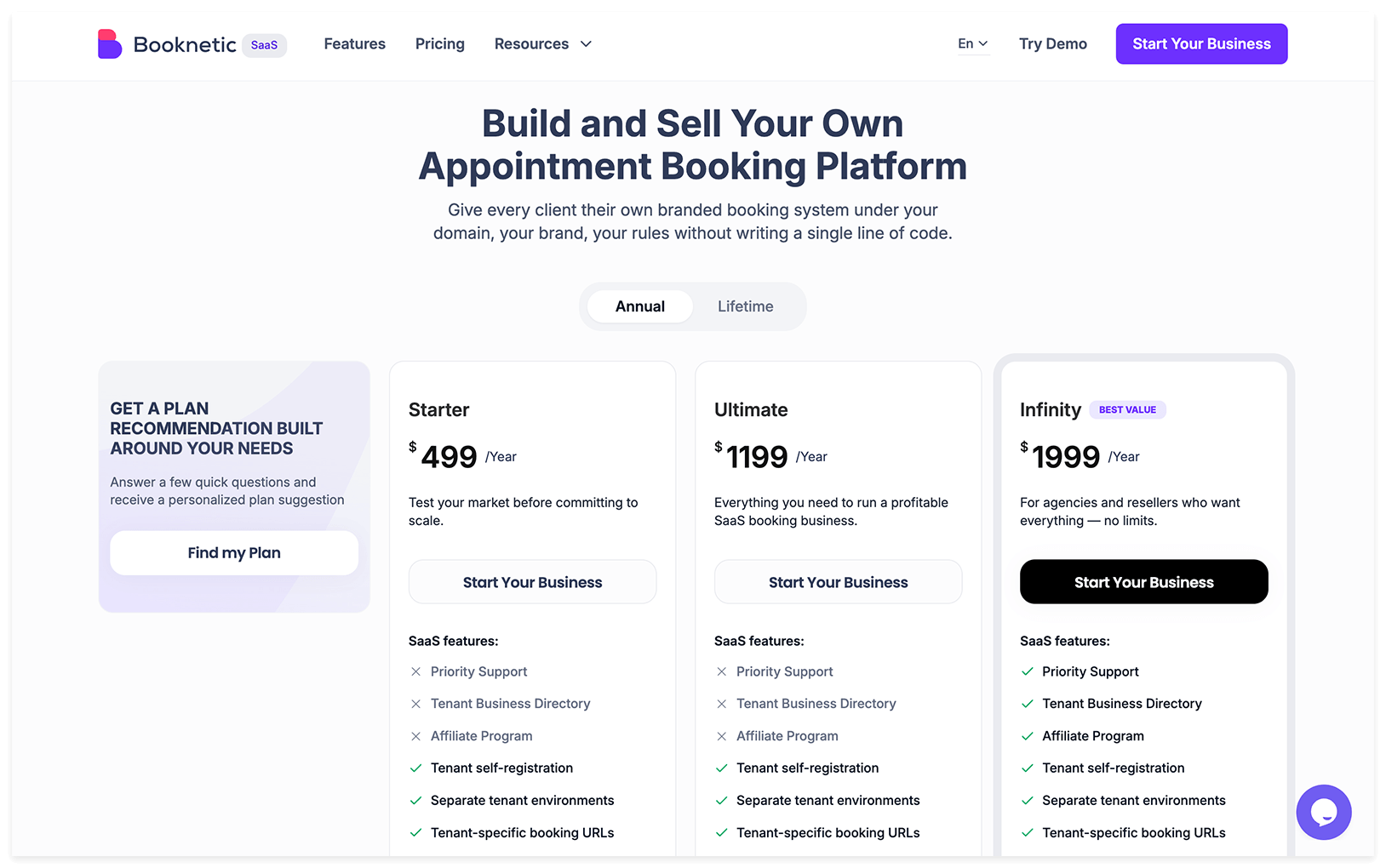
Pricing (standalone). Annual: Basic $45/yr promo / $89 regular, Standard $99/yr promo / $199 regular, Premium $199/yr promo / $399 regular, Elite $299/yr promo / $599 regular. Lifetime: Basic $99, Standard $239, Premium $599, Elite $899 (promo). (Verified booknetic.com, June 7, 2026.)
Pros:
- Native iOS + Android mobile apps for staff
- Multi-tenant SaaS tier ready for agencies launching their own booking platform
- Discord community (one of two plugins in this list with one)
- Fully localized marketing site in English, Spanish, and German
Cons:
- Not on WordPress.org — CodeCanyon-only distribution means no one-click wp-admin install, no auto-updates through the standard WP updater
- Trustpilot rating is 3.4★ with a bimodal pattern (43% 1-star) — a love-or-hate distribution worth checking yourself
- Permanent «Save 50%» anchor on every pricing tier (legal, but transparent buyers tend to discount it)
Verdict. If you specifically need a multi-tenant SaaS resell tier, or a fully localized Spanish/German marketing surface today, Booknetic is the more capable choice — Bookly has mobile apps but no multi-tenant SaaS resell tier. For everything else, the WP.org distribution gap and the bimodal review pattern weigh against it.
5. LatePoint — Best for the Brainstorm Force Ecosystem
What we tested. LatePoint Free on WP.org plus Starter tier ($79/yr intro / $99/yr regular) on a test WordPress 6.9 site.
Best for. Sites already on the Brainstorm Force ecosystem (Astra theme, Spectra blocks, ZipWP). LatePoint is owned by Brainstorm Force, and the cross-promotion across Astra (1M+ active installs) and Spectra (600K+) is reflected in tighter ecosystem integration.
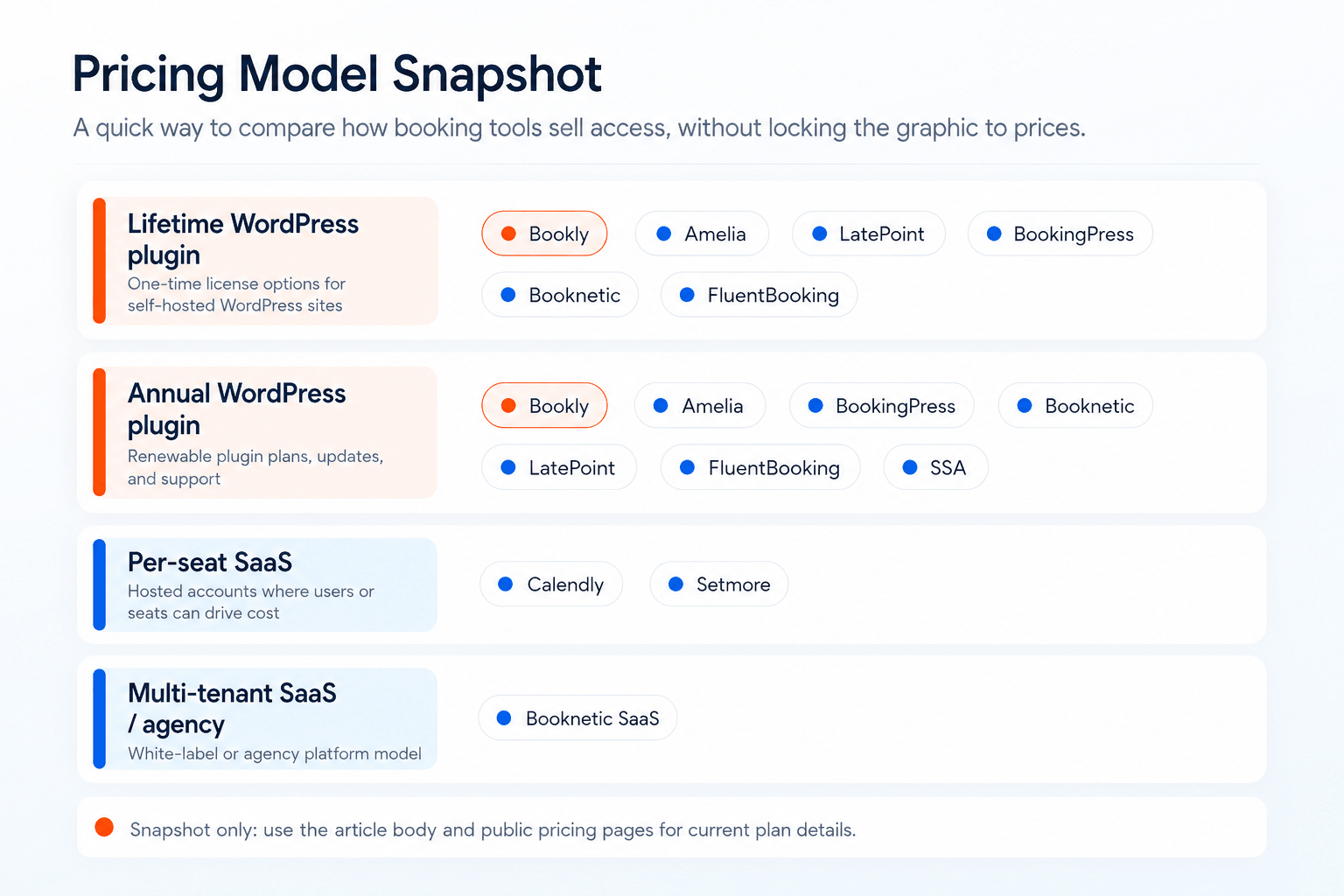
Pricing. Free on WP.org (Stripe-only payments, no calendar sync). Starter $79/yr promo / $99 regular, $199 lifetime promo / $249 regular (1 site). Scale $149/yr promo / $249 regular, $399 lifetime promo / $599 regular (5 sites). Agency $299/yr promo / $499 regular, $599 lifetime promo / $1,299 regular (100 sites). All tiers include the same feature set — differentiator is domain count. (Verified latepoint.com, June 7, 2026.)
Pros:
- All paid tiers include all features (no feature gating across tiers)
- Lifetime payment plans available (Agency $599 splittable as 11 × $59.99)
- Free tier on WP.org with full booking flow and admin/agent panels
- Modern UI
Cons:
- WordPress.org listing live since January 29, 2025 — ~16 months, with 80 WP.org reviews vs Bookly’s 570
- Free tier supports Stripe only — all other payment processors (PayPal, Braintree, WooCommerce, Square, Mollie, etc.) are Pro-gated
- No native mobile apps
- Strategic-investor comparison content on wpastra.com may bias side-by-side coverage you find on Google (Brainstorm Force is LatePoint’s investor since November 2023)
Verdict. If you build sites on Astra + Spectra and want native ecosystem integration, LatePoint is the natural pick. If you don’t have a Brainstorm Force stack reason, the much shorter WP.org track record and 80-review pool make Bookly or Amelia the safer pick.
6. FluentBooking — Best for FluentCRM Ecosystem Users
What we tested. FluentBooking Free + Solo tier ($63/yr promo, $79/yr regular) on a WordPress 6.9 site, with FluentCRM connected.
Best for. Operators who are already using FluentCRM (or planning to). FluentBooking is built by the WPManageNinja team — same shop as FluentCRM and FluentForms — and integrates more deeply with FluentCRM than any other plugin in this list.
Pricing. Free on WP.org. Annual: Solo $79/yr / $63 promo (1 site), Small Business $199/yr / $159 promo (5 sites), Agency $399/yr / $319 promo (unlimited). Lifetime: Solo $199, Small Business $436 / $349 promo, Agency $749 / $599 promo. (Verified fluentbooking.com, June 7, 2026.)
Pros:
- Tight FluentCRM integration — best-in-class if you’re in that ecosystem
- Modern UI (newer codebase than older plugins in this list)
- 4.7★ on WordPress.org with active maintenance
- Free tier with real functionality
- FluentBooking remains price-competitive on Agency site count, while Bookly is cheaper on entry and mid-tier annual/lifetime comparisons
Cons:
- Newer entrant (~2 years on market) — smaller review pool than Bookly or Amelia
- Best-value differentiation depends on FluentCRM use — outside that ecosystem the gap to Bookly narrows
- Plugin UI localization narrower than Bookly’s 9 languages
Verdict. If you are already on FluentCRM, FluentBooking is the natural pick because nothing else integrates as cleanly. Outside that ecosystem, Bookly’s maturity, deeper review pool, and broader plugin localization usually win.
7. Calendly — Best Off-WordPress SaaS Scheduler
What we tested. Calendly Free tier plus Standard ($120/seat/year) embedded in a WordPress page via the standard embed snippet. Ran 30 days of solo meeting booking.
Best for. Individual schedulers who don’t actually need WordPress booking — they need a meeting scheduler that happens to be embeddable in WordPress. If your use case is «I want clients to book a 30-minute call with me», Calendly is the honest pick over any WordPress plugin in this list.
Pricing. Free. Standard $120/seat/year ($10/seat/mo billed annually). Teams $192/seat/year ($16/seat/mo billed annually). Enterprise custom. SMS add-on $3/mo. (Verified calendly.com, June 7, 2026.) Per-seat pricing compounds: a team of 3 on Teams = $576/yr, a team of 10 = $1,920/yr.
Pros:
- Best-in-class scheduling UX for individuals and small teams
- Deep enterprise integration coverage (Salesforce, HubSpot, Microsoft, LinkedIn, Zoom)
- G2 4.7★ × 2,615 reviews — by far the deepest review pool in this list
- Hosted (no WordPress maintenance overhead)
Cons:
- Not a WordPress plugin — embed-only, scheduling lives on calendly.com
- Per-seat pricing compounds for teams — a team of 10 over 3 years = $5,760 on Teams
- WordPress integration is shallow — no service catalog, no staff schedule UI, no native WP payment integration
- Hosted in US/AWS — for EU businesses, customer data crosses the Atlantic
Verdict. If you realized you don’t actually need WordPress for booking — you need a meeting scheduler — Calendly is the honest pick. For service-business workflows (services, staff, deposits, packages), stay WP-native. We also wrote a full Bookly vs Calendly comparison if you want the side-by-side.
8. Acuity Scheduling (Squarespace) — Best for Squarespace-Adjacent Businesses
What we tested. Acuity Starter tier ($20/mo or $16/mo annual) embedded in a test WordPress site via iframe.
Best for. Operators already on Squarespace (Acuity is owned by Squarespace) or businesses where the booking page is the primary marketing surface and the WordPress site is secondary.
Pricing. Starter $20/mo or $16/mo billed annually (1 calendar). Standard $34/mo or $27/mo annually (up to 6 calendars). Premium $61/mo or $49/mo annually (up to 36 calendars). No lifetime option. (Verified squarespace.com/scheduling, June 7, 2026.)
Pros:
- 15+ years on market — longest track record of any product in this list (Acuity launched in 2006)
- Strong G2 reputation (4.7★)
- Hosted (no WordPress maintenance)
- Deep Squarespace integration if you’re in that ecosystem
Cons:
- Not a WordPress plugin — embed only
- Subscription-only pricing (no lifetime)
- Most differentiation lives inside Squarespace
Verdict. Acuity is the right pick if you are on Squarespace or want a hosted scheduler with a long track record. For WordPress-first operators, the embed model loses to native plugin integration on conversion and customization.
9. Setmore — Best Free SaaS for Solo / 2-Person Teams
What we tested. Setmore Free (1 user, unlimited appointments) embedded in a WordPress page.
Best for. Solo operators or two-person teams that want a free SaaS scheduler with embedded WordPress support. Setmore’s free tier is genuinely usable — not a 14-day trial that disables features.
Pricing. Free for 1 user with unlimited appointments. Paid tiers around $5/user/mo (annual billing) — among the cheapest SaaS schedulers in this list. (Verify setmore.com on publication day for current pricing.)
Pros:
- Generous free tier — actually free, not a teaser
- Cheap paid tier (~$5/user/mo)
- Hosted (no WP maintenance)
- Strong G2 presence and active support
Cons:
- Not a WordPress plugin — embed only
- Less feature depth than Calendly or Acuity at paid tiers
- Free tier is single-user (small teams need paid)
Verdict. Setmore is the pick for solo operators who want a free SaaS scheduler with a WordPress embed. For service-business workflows that need to live inside WordPress, a native plugin (Bookly, SSA, Amelia) is the better fit.
10. Simply Schedule Appointments — Best for Solo Consultants & First-Time WP Booking Setup
What we tested. SSA Free on WP.org plus the Plus tier ($99/yr intro, $129/yr renewal) on a fresh WordPress 6.9 install. Ran a 30-day setup of services, calendar, and Stripe.
Best for. Solo consultants, coaches, and first-time WordPress booking setup. The onboarding wizard is the cleanest in this list, and SSA is the most-cited plugin in Google AI Overviews for «WordPress booking» queries in 2026 — which compounds discovery if AI search referrals matter to you.
Pricing. Free on WP.org. Plus $99/yr intro / $129/yr renewal (1 site). Professional $199/yr intro / $249/yr renewal (1 site). Business $399/yr intro / $499/yr renewal (1 site). All single-site, annual only, no lifetime. 30-day money-back guarantee. (Verified simplyscheduleappointments.com, June 7, 2026.)
Pros:
- Cleanest onboarding wizard in the WordPress booking category
- Highest-cited plugin in Google AI Overviews for WordPress booking queries
- 60K+ active installs on WP.org, 100% positive rating (152×5★ + 1×4★ + 1×3★, 0 negative reviews)
- Plugin UI in 11 locales
- Real free tier with setup wizard, blackout dates, basic notifications
Cons:
- No lifetime option — annual subscriptions only, with intro prices reverting to higher renewals year 2
- Single-site licenses across all tiers — no multi-site bundle for agencies
- Less feature depth than Bookly or Amelia on deposits, packages, complex group bookings
Verdict. If you are a solo consultant or setting up WordPress booking for the first time and want the smoothest path from zero to live, SSA is the honest pick — particularly if AI search referrals matter to you long-term. For service businesses needing deeper workflows, multi-site licenses, or lifetime pricing, Bookly is the more flexible fit.
When a Competitor Is Actually the Better Choice
We are the team behind Bookly. We still think there are honest scenarios where a different plugin or platform will serve you better. Here are the three most common.
When Amelia Is the Better Choice
If your booking page is a primary brand surface — a wellness studio, a high-end salon, a design-first agency — Amelia ships with more polished default booking-form layouts than Bookly does out of the box. You can style Bookly forms to match any brand, but Amelia gets you there faster without theme overrides. Amelia Pro at $199/yr promo (5 domains) is also a strong fit for small agencies running a few branded client sites.
When Calendly (or Acuity) Is the Better Choice
If your actual use case is «I want clients to book a 30-minute call with me» and not «I run a service business with staff, services, and payments on my WordPress site», Calendly or Acuity will serve you better. They were built for that scheduling workflow. Embedding a WordPress booking plugin to handle one-on-one meetings is overkill — you don’t need staff management, deposit logic, or service catalogs. Per-seat pricing compounds for teams, so this fit is strongest for individual schedulers.
When Setmore Is the Better Choice
If you are a true solo operator on a tight budget, Setmore’s free tier is genuinely usable and embeddable into WordPress. You won’t get the depth of a WordPress-native plugin, but you also won’t pay anything. For solopreneurs running a side practice or testing whether online booking even makes sense for their business, Setmore is the right starting point. Upgrade to a WP-native plugin like Bookly later, once you have signal that booking volume justifies the investment.
How to Migrate to Bookly from Any Plugin in This List
If after reading this you decide Bookly is the right fit, the migration path is the same regardless of which plugin you are coming from. Bookly’s built-in Import appointments feature (found under Bookly → Diagnostics → Import appointments) handles the full data transfer from a CSV file: staff members, services, customers, appointments, and payments. No third-party tools required.
Before you start: back up your WordPress database. The import creates new records immediately and changes cannot be easily undone outside the in-session rollback.
Step 1 — Export from your current plugin
Export menus can move between plugin versions, so treat the paths below as the verified starting point for this comparison. See each vendor’s official export documentation for the exact menu path in your installed version.
| Current plugin | Export path |
|---|---|
| Amelia | Amelia → Bookings → Export |
| Booknetic | Booknetic → Appointments → Export to CSV |
| LatePoint | LatePoint → Appointments → Download CSV |
| BookingPress | BookingPress → Bookings → Export |
| FluentBooking | FluentBooking → Bookings → Export |
| Calendly / Acuity / Setmore | Account → Settings → Export bookings (CSV) |
Make sure your CSV contains, at minimum: Start Date, End Date (or Duration), Staff Name, Service Name, Customer Name, Customer Email, Customer Phone, Price, and Status.
Step 2 — Upload the CSV in Bookly
Navigate to Bookly → Diagnostics → Import appointments. Click Choose file, select your export CSV, and upload. Map each CSV column to the corresponding Bookly field (Start Date, End Date / Duration, Staff Name, Service Name, Price, Customer Name, Email, Phone, Status).
Step 3 — Run the import and review
Bookly shows a summary on completion: staff members imported, services imported, customers imported, appointments imported. If the numbers look off, click Back and review the column mapping before re-running. If you need to undo, Bookly detects the previously imported file and offers a Rollback button.
Step 4 — Reconnect calendars and update shortcodes
Imported appointments do not sync to external calendars automatically. After the import, reconnect Google Calendar or Outlook for each staff member. Replace your old plugin’s shortcodes with [bookly-form] across pages.
Frequently Asked Questions
What is the best Bookly alternative for WordPress in 2026?
For most WordPress service businesses, the question is reversed — Bookly is the strongest WP-native default, with 12+ years on WordPress.org, 60,000+ active installs, 570 reviews at 4.4 stars, and Pro from $39/yr promo / $99 regular or $99 lifetime promo / $129 regular. The honest bookly alternatives that beat it in specific scenarios are: Amelia for design-driven sites with polished default forms, Booknetic for agencies launching multi-tenant SaaS, Calendly for off-WordPress 1-on-1 scheduling, and Setmore for solo operators on a strict zero-budget free tier. Pick by scenario, not by blanket recommendation.
Is Bookly free?
Yes, partially. Bookly Free on WordPress.org gives you the core booking flow with up to 5 services and 1 staff member. Stripe Payments are available through Bookly Cloud with a 0.9% application fee. SMS and WhatsApp notifications work across every Bookly plan through Bookly Cloud on a pay-as-you-go basis. Pro starts at $39/yr promo / $99 regular or $99 lifetime promo / $129 regular. Business starts at $69/yr promo / $129 regular or $129 lifetime promo / $149 regular. Ultimate starts at $159/yr promo / $199 regular or $199 lifetime promo / $299 regular. Compared to Amelia Lite or LatePoint Free, Bookly’s free tier is narrower on service/staff count but still supports payments through Bookly Cloud.
How much does Bookly cost?
Bookly uses site-count lifetime and annual pricing — not per-seat. Pro, 1 site: $39/yr promo / $99 regular, or $99 lifetime promo / $129 regular. Business: $69/yr promo / $129 regular or $129 lifetime promo / $149 regular for 1 site; $129/yr promo / $249 regular or $249 lifetime promo / $349 regular for 5 sites. Ultimate: $159/yr promo / $199 regular or $199 lifetime promo / $299 regular for 1 site; $249/yr promo / $499 regular or $499 lifetime promo / $999 regular for 20 sites; $299/yr promo / $699 regular or $699 lifetime promo / $1,299 regular for 100 sites. Each license covers its WordPress domain with unlimited staff and services on that domain. Bookly Cloud includes a $5 signup credit and up to $400 bonus on the first top-up.
Is Bookly cheaper than Amelia?
Yes in most common site-count scenarios. Bookly Pro $39/yr promo beats Amelia Starter $49/yr by $10/yr. Bookly Business 1-site $69/yr promo / $129 lifetime promo beats Amelia Standard $89/yr promo / $269 lifetime promo — annual $20 cheaper, lifetime $140 cheaper. For 5 domains, Bookly Business 5-site $129/yr promo / $249 lifetime promo beats Amelia Pro $199/yr promo / $449 lifetime promo — annual $70 cheaper, lifetime $200 cheaper. Amelia still has the advantage when you specifically need unlimited domains on an annual plan.
Is Bookly cheaper than Calendly?
For WordPress service businesses, yes — substantially. Calendly is per-seat ($120/yr Standard, $192/yr Teams), so cost scales linearly with team size. Bookly is priced by site count, and each licensed WordPress domain supports unlimited staff and services. A team of 3 on Calendly Teams = $1,728 over 3 years; Bookly Business 1-site lifetime is $129 promo / $149 regular. A team of 10 on Calendly Teams = $5,760 over 3 years; even Bookly Ultimate 20-site lifetime is $499 promo / $999 regular. The footnote: Calendly is a meeting scheduler, Bookly is a WordPress booking plugin — they solve different problems even when they look similar.
Does Bookly work without WordPress?
No. Bookly is a WordPress plugin — it requires a WordPress installation to run. If you are not on WordPress and don’t plan to be, a SaaS scheduler like Calendly, Acuity, or Setmore is the right category, not a WordPress plugin. If you want the closest WordPress-style flexibility without WordPress, look at the SaaS options in this list.
Can I migrate my data from another plugin to Bookly?
Yes. Bookly’s built-in Import appointments tool (under Bookly → Diagnostics → Import appointments) accepts a CSV file with staff, services, customers, appointments, and payments. Most competitor plugins export bookings to CSV — Amelia via Amelia → Bookings → Export, Booknetic via Booknetic → Appointments → Export to CSV, LatePoint via LatePoint → Appointments → Download CSV. After the import, Bookly shows a per-record summary, and you can roll back the same session if anything looks wrong. Calendars need to be reconnected manually after the import — appointment data transfers, but external calendar sync does not.
What happens if I stop renewing my Bookly annual subscription?
Your purchase code becomes invalid, auto-updates stop, and activated Pro/Business/Ultimate features revert to free-tier behavior. Existing booking data remains in your WordPress database — you don’t lose customer or appointment records. You can renew at any time to restore feature access. If you don’t want to deal with renewals at all, lifetime options start at Pro $99 promo / $129 regular, Business $129 promo / $149 regular, and Ultimate $199 promo / $299 regular.
How does Bookly compare to LatePoint?
LatePoint listing on WordPress.org dates from January 29, 2025 — ~16 months old as of publication, with 80 WP.org reviews at 4.9★. Bookly has been on WordPress.org since October 10, 2014 — 12+ years, with 570 WP.org reviews at 4.4★ and 60,000+ active installs. LatePoint reports 100K+ active installs. LatePoint Starter is $79/yr promo / $99 regular; Bookly Pro starts lower at $39/yr promo / $99 regular or $99 lifetime promo / $129 regular. On 5-site tiers, Bookly Business 5-site is $129/yr promo / $249 regular or $249 lifetime promo / $349 regular, while LatePoint Scale is $149/yr promo / $249 regular or $399 lifetime promo / $599 regular. LatePoint lacks native mobile apps; Bookly has iOS and Android apps. Both offer lifetime tiers. LatePoint Free supports Stripe-only payments; Bookly Free can use Stripe Payments through Bookly Cloud with a 0.9% application fee.
Should I switch from Bookly to a different plugin?
Probably not, unless one of these is true: (1) your booking page is part of a design-first brand and you can’t justify styling work to match — try Amelia. (2) You are launching a multi-tenant SaaS resold under your own brand — Booknetic SaaS is the only tier in this list that ships that today. (3) Your actual use case is 1-on-1 meeting scheduling and not service-business workflows — Calendly or Acuity. (4) You are deep in the FluentCRM ecosystem and want the cleanest automation handoff — FluentBooking. Outside these scenarios, the WP.org maturity, review depth, and flexible annual/lifetime pricing usually keep Bookly as the better choice.
Verdict — Which Bookly Alternative Should You Pick?
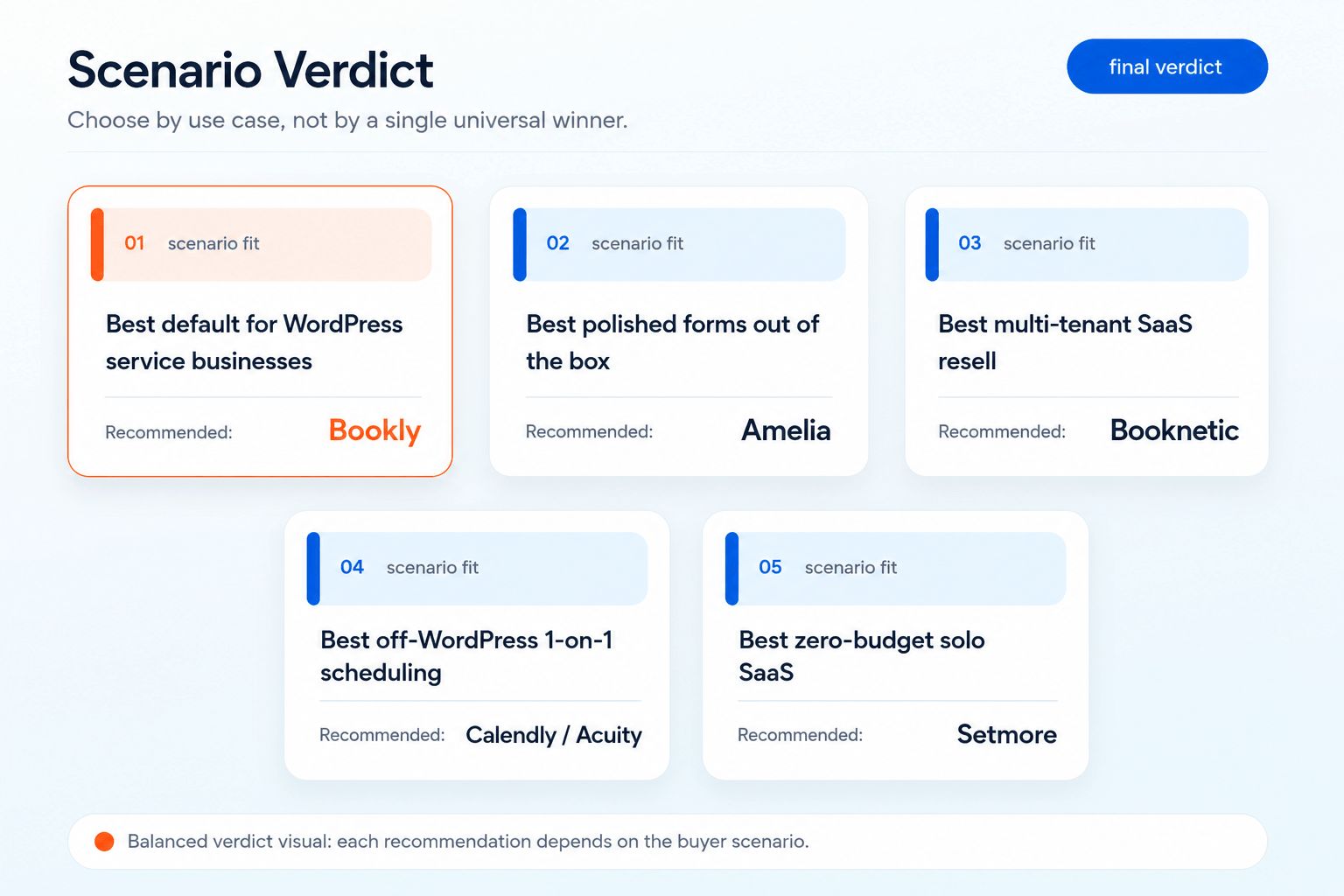
After 30 days of side-by-side testing across all 10 alternatives and an August 13, 2026 Bookly pricing re-check, the best bookly alternative answer is scenario-based, not a blanket recommendation.
Pick (or stay on) Bookly if…
- You run a WordPress service business and want the deepest WP-native track record (12+ years, 570 reviews)
- You prefer flexible annual and lifetime pricing, with Pro from $39/yr promo / $99 regular or $99 lifetime promo / $129 regular
- You value native iOS + Android mobile apps for staff and unified Cloud billing for SMS, WhatsApp, and Stripe Payments / Stripe Connect
- You want a free tier on WP.org that can use Stripe Payments through Bookly Cloud
- You’re an agency looking for a battle-tested partner with deep ecosystem coverage
Pick Amelia if…
- Your booking page is part of the brand and you want polished visual booking forms out of the box
- You also need event booking alongside appointment scheduling
- You run exactly 5 client sites and Pro $199/yr promo (5 domains) matches your scope
Pick Booknetic if…
- You’re building a multi-tenant booking SaaS and want the resell tier ready now ($499–1,999/yr or $999–3,399 lifetime)
- You need a fully localized Spanish or German marketing site today
- You’re comfortable with CodeCanyon distribution instead of WordPress.org one-click install
Pick Calendly if…
- Your actual use case is 1-on-1 meeting scheduling, not service-business workflows
- You don’t need WordPress booking — you need a scheduler embedded in WordPress
- Your team is small (per-seat compounds painfully past 5 seats)
Pick Simply Schedule Appointments if…
- You are a solo consultant or setting up WordPress booking for the first time and want the cleanest onboarding wizard
- AI search referrals matter to your long-term plan (SSA leads AI Overview citations for WordPress booking queries)
- You don’t need lifetime pricing and are comfortable with $99/yr annual
Pick Setmore if…
- You are a true solopreneur on a strict zero-budget free tier
- You want SaaS scheduling embedded in WordPress without a paid plugin
Hybrid Approach: Use Different Tools for Different Sites
For agencies running mixed portfolios, the practical answer can be more than one tool. Default new WordPress builds to Bookly for the longest track record and flexible annual/lifetime pricing. Use Calendly or Acuity for individual client schedulers where the actual job-to-be-done is 1-on-1 meeting booking, not service-business workflow. Use Booknetic SaaS for the one client launching a multi-tenant booking platform under their own brand.
Still weighing the bookly alternatives decision? Start with the free Bookly plugin on WordPress.org, run it on one site for two weeks, and benchmark against any alternative in this list before committing either way.
Try Bookly Free on WordPress.org